
التحكم في سير عمل AI مع Flows
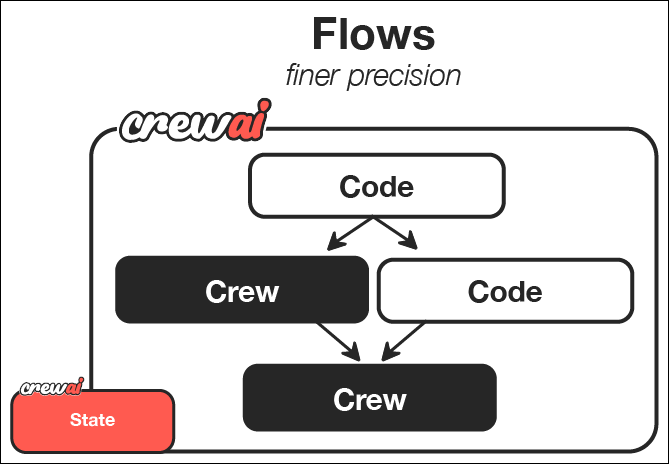
تمثل CrewAI Flows المستوى التالي في تنسيق AI - الجمع بين القوة التعاونية لفرق Agents AI مع دقة ومرونة البرمجة الإجرائية. بينما تتفوق Crews في تعاون الـ Agents، تمنحك Flows تحكمًا دقيقًا في كيفية ووقت تفاعل المكونات المختلفة لنظام AI. في هذا الدليل، سنمشي عبر إنشاء CrewAI Flow قوي ينشئ دليلًا تعليميًا شاملاً حول أي موضوع.ما يجعل Flows قوية
تمكّنك Flows من:- الجمع بين أنماط تفاعل AI مختلفة - استخدام Crews للمهام التعاونية المعقدة واستدعاءات LLM المباشرة للعمليات الأبسط والكود العادي للمنطق الإجرائي
- بناء أنظمة قائمة على الأحداث - تحديد كيفية استجابة المكونات لأحداث وتغييرات بيانات محددة
- الحفاظ على الحالة عبر المكونات - مشاركة وتحويل البيانات بين أجزاء مختلفة من تطبيقك
- التكامل مع الأنظمة الخارجية - ربط سير عمل AI بسلاسة مع قواعد البيانات وواجهات API وواجهات المستخدم
- إنشاء مسارات تنفيذ معقدة - تصميم فروع شرطية ومعالجة متوازية وسير عمل ديناميكية
المتطلبات المسبقة
قبل البدء، تأكد من:- تثبيت CrewAI باتباع دليل التثبيت
- إعداد مفتاح API لنموذج LLM في بيئتك، باتباع دليل إعداد LLM
- فهم أساسي لـ Python
الخطوة 1: إنشاء مشروع CrewAI Flow جديد
نظرة عامة على إطار عمل CrewAI
الخطوة 2: فهم هيكل المشروع
يستخدم الـ crew المبدئي المضمّن في مشروع Flow بنية Python/YAML الكلاسيكية. لاستخدام crew بنمط JSON-first داخل Flow، أنشئcrew.jsonc و agents/*.jsonc داخل مجلد الـ crew وحمّله عبر crewai.project.load_crew كما في Flows.
الخطوة 3: إضافة Crew كتابة المحتوى
الخطوة 4: تهيئة Crew كتابة المحتوى
سنهيئ crew كتابة المحتوى باستخدام JSONC. سنعرّف Agent للكتابة وAgent للمراجعة، ثم نحمّلcrew.jsonc من خطوة Flow.
- أنشئ
src/guide_creator_flow/crews/content_crew/agents/content_writer.jsonc:
- أنشئ
src/guide_creator_flow/crews/content_crew/agents/content_reviewer.jsonc:
provider/model-id بالنموذج الذي تستخدمه، مثل openai/gpt-4o أو gemini/gemini-3.7-flash أو anthropic/claude-sonnet-4-6.
- أنشئ
src/guide_creator_flow/crews/content_crew/crew.jsonc:
- استبدل
src/guide_creator_flow/crews/content_crew/content_crew.pyبمحمل صغير:
الخطوة 5: إنشاء Flow
الآن الجزء المثير - إنشاء Flow الذي سينسّق عملية إنشاء الدليل بالكامل. راجع الملف الإنجليزي الأصلي للكود الكامل لـmain.py حيث أن الكود يبقى كما هو.
الخطوة 6: إعداد متغيرات البيئة
أنشئ ملف.env في جذر مشروعك بمفاتيح API. راجع دليل إعداد LLM لتفاصيل تهيئة المزود.
.env
الخطوة 7: تثبيت التبعيات
الخطوة 8: تشغيل Flow
- سيطلب منك موضوعًا ومستوى الجمهور
- سينشئ مخططًا منظمًا لدليلك
- سيعالج كل قسم مع تعاون الكاتب والمراجع
- أخيرًا سيجمع كل شيء في دليل شامل
الخطوة 9: تصوير Flow
الخطوة 10: مراجعة المخرجات
بمجرد اكتمال Flow، ستجد ملفين في مجلدoutput:
guide_outline.json: يحتوي على المخطط المنظم للدليلcomplete_guide.md: الدليل الشامل بجميع الأقسام
الميزات الرئيسية الموضّحة
يوضح Flow منشئ الدليل عدة ميزات قوية لـ CrewAI:- تفاعل المستخدم: يجمع Flow مدخلات مباشرة من المستخدم
- استدعاءات LLM المباشرة: يستخدم فئة LLM لتفاعلات AI فعّالة وأحادية الغرض
- بيانات منظمة مع Pydantic: يستخدم نماذج Pydantic لضمان سلامة الأنواع
- معالجة تسلسلية مع سياق: يكتب الأقسام بالترتيب ويوفر الأقسام السابقة كسياق
- Crews متعددة الـ Agents: يستفيد من Agents متخصصة (كاتب ومراجع) لإنشاء المحتوى
- إدارة الحالة: يحافظ على الحالة عبر خطوات العملية المختلفة
- بنية قائمة على الأحداث: يستخدم مزخرف
@listenللاستجابة للأحداث
الخطوات التالية
- جرّب هياكل Flow أكثر تعقيدًا وأنماطًا
- جرّب استخدام
@router()لإنشاء فروع شرطية - استكشف دوال
and_وor_لتنفيذ متوازٍ أكثر تعقيدًا - اربط Flow بواجهات API خارجية وقواعد بيانات وواجهات مستخدم
- ادمج عدة Crews متخصصة في Flow واحد
- أنشئ تطبيقات دردشة متعددة الجولات مع تدفقات المحادثة (
kickoffلكل رسالة،ChatSession، تأجيل التتبع)
تهانينا! لقد بنيت بنجاح أول CrewAI Flow يجمع بين الكود العادي واستدعاءات LLM المباشرة ومعالجة Crew لإنشاء دليل شامل. هذه المهارات الأساسية تمكّنك من إنشاء تطبيقات AI متطورة بشكل متزايد.