> ## Documentation Index
> Fetch the complete documentation index at: https://docs.crewai.com/llms.txt
> Use this file to discover all available pages before exploring further.
# Set up the Policies
> Apply organization-wide policies across many automations from a single place.
**ACP (Beta) Docs Navigation**
* [Overview](/en/enterprise/features/agent-control-plane/overview)
* [Monitoring](/en/enterprise/features/agent-control-plane/monitoring)
* **Policies** *(you are here)*
## Overview
Policies let you enforce organization-wide controls — today **PII Redaction** and **Cost Limit** — across many automations at once, instead of configuring each deployment individually. Open the **Policies** tab in the [Agent Control Plane](/en/enterprise/features/agent-control-plane/overview) to manage them.
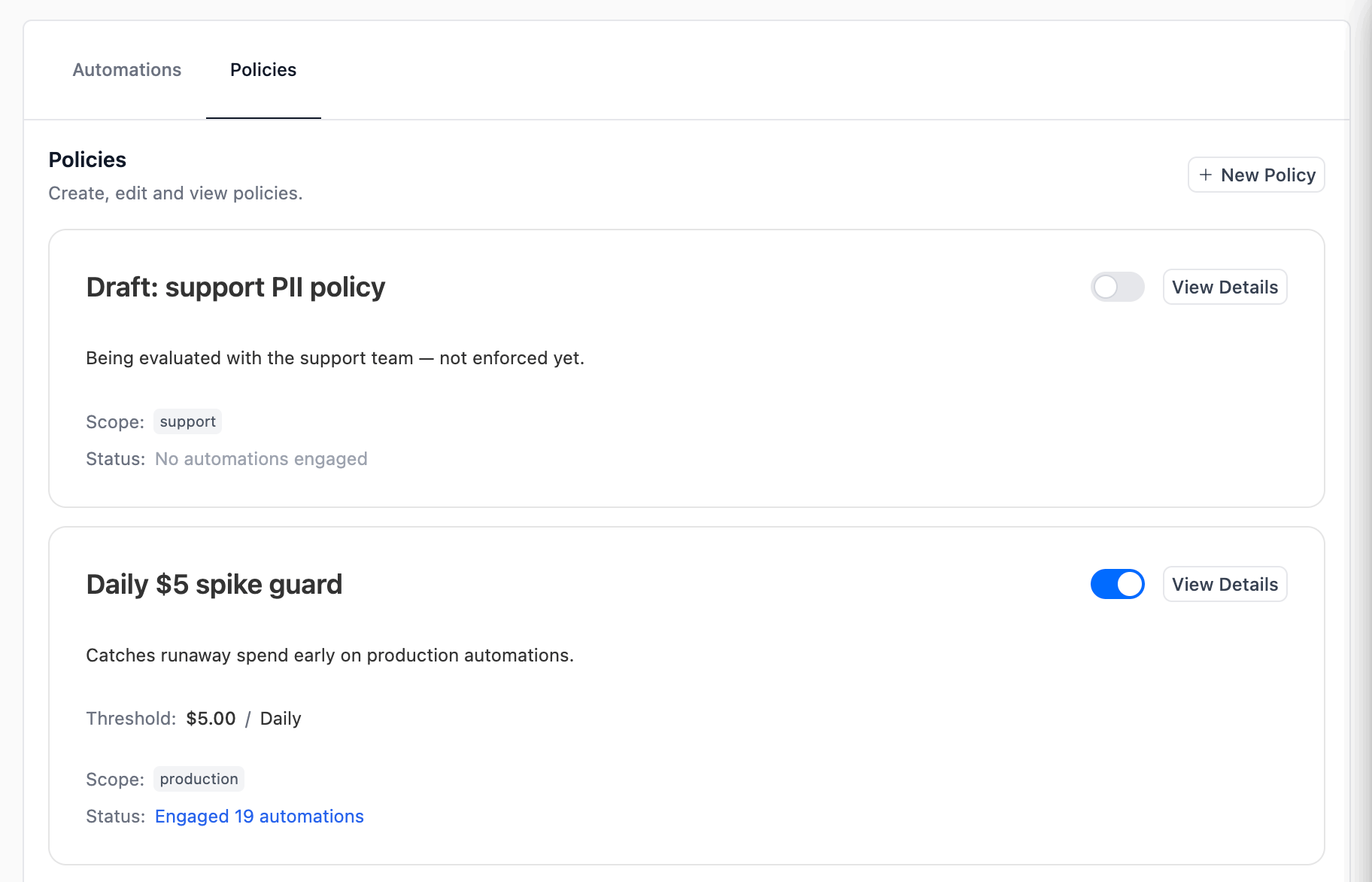 Each policy card shows the name, description, the **scope** the policy applies to (selected tools and tags), and a count of **engaged automations** — deployments that currently match the scope. The toggle on the right enables or disables the policy without deleting it.
## Requirements
**Enterprise Plan or Ultra Plan** is required to create or edit **PII Redaction** policies. Lower-tier organizations can still open the Policies tab and view existing policies, but the PII editor renders read-only with an "Enterprise" lock pill and the alert *"PII Redaction policies require an Enterprise plan."* — contact your account owner or sales to upgrade. **Cost Limit** policies are **not** plan-gated and can be created on any plan where the Agent Control Plane is enabled.
* The **Agent Control Plane** feature must be enabled for your organization. See [Overview — Requirements](/en/enterprise/features/agent-control-plane/overview#requirements).
* The `manage` [RBAC permission](/en/enterprise/features/rbac) on Agent Control Plane is required to create, edit, toggle, or delete policies. The `read` permission is enough to view them.
* All policy changes are versioned for auditing.
## Policy types
Every policy is one of the types below. Open the tab for the policy you want to enforce.
Applies PII redaction to executions of every matching automation, using the same entity catalog and custom recognizers documented in [PII Redaction for Traces](/en/enterprise/features/pii-trace-redactions).
Creating or editing PII Redaction policies requires an **Enterprise** or **Ultra** plan. On lower tiers the PII editor renders read-only with an "Enterprise" lock pill.
**Configuration** — in the **PII Mask Type** table, check each entity type you want covered and choose how to handle it:
* **Mask** — replaces the match with the entity label (e.g. ``).
* **Redact** — removes the matched text entirely.
See [PII Redaction for Traces](/en/enterprise/features/pii-trace-redactions) for the full entity catalog and how to add organization-level custom recognizers.
Emails the recipients you choose when a matching automation's LLM spend exceeds a budget threshold in the selected period. Available on **all plans** where the Agent Control Plane is enabled — it is not Enterprise-gated.
Cost Limit policies are **notify-only**. They never pause, throttle, or stop a run — they only send an email so a human can decide what to do. Adjust the budget or remove the policy if you no longer want the alert.
**Configuration**
| Field | Description |
| ---------------------- | ----------------------------------------------------------------------------------------------------------------------------------------------------------------------------------------------------------------------------------- |
| **Budget period** | The window spend is measured over: **Daily**, **Weekly**, or **Monthly** (default *Monthly*). Spend resets at the start of each calendar period. |
| **Threshold (USD)** | The dollar amount that triggers an alert. Must be greater than `0`. The alert fires once the automation's spend for the current period exceeds this value. |
| **Recipient emails** | Up to 50 email addresses. Type an address and press **Enter** or comma to add it as a chip; **Backspace** removes the last chip. These do not need to be CrewAI users. |
| **Notify roles** | Optionally select organization [roles](/en/enterprise/features/rbac); the alert is sent to every member of the chosen roles. Roles with no members can't be selected. You must provide at least one recipient — an email or a role. |
| **Re-alert frequency** | How often the alert can re-fire while an automation stays over budget: **Once per period**, **Every hour while over**, **Every 4h while over**, or **Daily while over**. Re-alerts are capped at 24 per period. |
**How spend is measured and matched**
* The threshold is evaluated **per automation**, not summed across the whole scope. Each engaged automation has its own running total for the period.
* A policy can match many automations via its conditions (tools/tags), and a single automation can be covered by **multiple** Cost Limit policies at once. Each policy tracks its own budget and alert state independently — they don't merge.
* A background check compares each engaged automation's period-to-date spend against the threshold and sends the email when it's exceeded. Because the check runs periodically, expect a short delay between crossing the threshold and the email arriving.
**The alert email**
When an automation goes over budget, recipients get an email summarizing the overage — the automation name, the **current spend**, the **budget threshold**, and how far over it is in both dollars and percent (e.g. `$0.38` current vs a `$0.10` budget = `+277%`). The email reiterates that the run was **not** paused.
More policy types will be added over time.
## Creating a policy
Each policy card shows the name, description, the **scope** the policy applies to (selected tools and tags), and a count of **engaged automations** — deployments that currently match the scope. The toggle on the right enables or disables the policy without deleting it.
## Requirements
**Enterprise Plan or Ultra Plan** is required to create or edit **PII Redaction** policies. Lower-tier organizations can still open the Policies tab and view existing policies, but the PII editor renders read-only with an "Enterprise" lock pill and the alert *"PII Redaction policies require an Enterprise plan."* — contact your account owner or sales to upgrade. **Cost Limit** policies are **not** plan-gated and can be created on any plan where the Agent Control Plane is enabled.
* The **Agent Control Plane** feature must be enabled for your organization. See [Overview — Requirements](/en/enterprise/features/agent-control-plane/overview#requirements).
* The `manage` [RBAC permission](/en/enterprise/features/rbac) on Agent Control Plane is required to create, edit, toggle, or delete policies. The `read` permission is enough to view them.
* All policy changes are versioned for auditing.
## Policy types
Every policy is one of the types below. Open the tab for the policy you want to enforce.
Applies PII redaction to executions of every matching automation, using the same entity catalog and custom recognizers documented in [PII Redaction for Traces](/en/enterprise/features/pii-trace-redactions).
Creating or editing PII Redaction policies requires an **Enterprise** or **Ultra** plan. On lower tiers the PII editor renders read-only with an "Enterprise" lock pill.
**Configuration** — in the **PII Mask Type** table, check each entity type you want covered and choose how to handle it:
* **Mask** — replaces the match with the entity label (e.g. ``).
* **Redact** — removes the matched text entirely.
See [PII Redaction for Traces](/en/enterprise/features/pii-trace-redactions) for the full entity catalog and how to add organization-level custom recognizers.
Emails the recipients you choose when a matching automation's LLM spend exceeds a budget threshold in the selected period. Available on **all plans** where the Agent Control Plane is enabled — it is not Enterprise-gated.
Cost Limit policies are **notify-only**. They never pause, throttle, or stop a run — they only send an email so a human can decide what to do. Adjust the budget or remove the policy if you no longer want the alert.
**Configuration**
| Field | Description |
| ---------------------- | ----------------------------------------------------------------------------------------------------------------------------------------------------------------------------------------------------------------------------------- |
| **Budget period** | The window spend is measured over: **Daily**, **Weekly**, or **Monthly** (default *Monthly*). Spend resets at the start of each calendar period. |
| **Threshold (USD)** | The dollar amount that triggers an alert. Must be greater than `0`. The alert fires once the automation's spend for the current period exceeds this value. |
| **Recipient emails** | Up to 50 email addresses. Type an address and press **Enter** or comma to add it as a chip; **Backspace** removes the last chip. These do not need to be CrewAI users. |
| **Notify roles** | Optionally select organization [roles](/en/enterprise/features/rbac); the alert is sent to every member of the chosen roles. Roles with no members can't be selected. You must provide at least one recipient — an email or a role. |
| **Re-alert frequency** | How often the alert can re-fire while an automation stays over budget: **Once per period**, **Every hour while over**, **Every 4h while over**, or **Daily while over**. Re-alerts are capped at 24 per period. |
**How spend is measured and matched**
* The threshold is evaluated **per automation**, not summed across the whole scope. Each engaged automation has its own running total for the period.
* A policy can match many automations via its conditions (tools/tags), and a single automation can be covered by **multiple** Cost Limit policies at once. Each policy tracks its own budget and alert state independently — they don't merge.
* A background check compares each engaged automation's period-to-date spend against the threshold and sends the email when it's exceeded. Because the check runs periodically, expect a short delay between crossing the threshold and the email arriving.
**The alert email**
When an automation goes over budget, recipients get an email summarizing the overage — the automation name, the **current spend**, the **budget threshold**, and how far over it is in both dollars and percent (e.g. `$0.38` current vs a `$0.10` budget = `+277%`). The email reiterates that the run was **not** paused.
More policy types will be added over time.
## Creating a policy
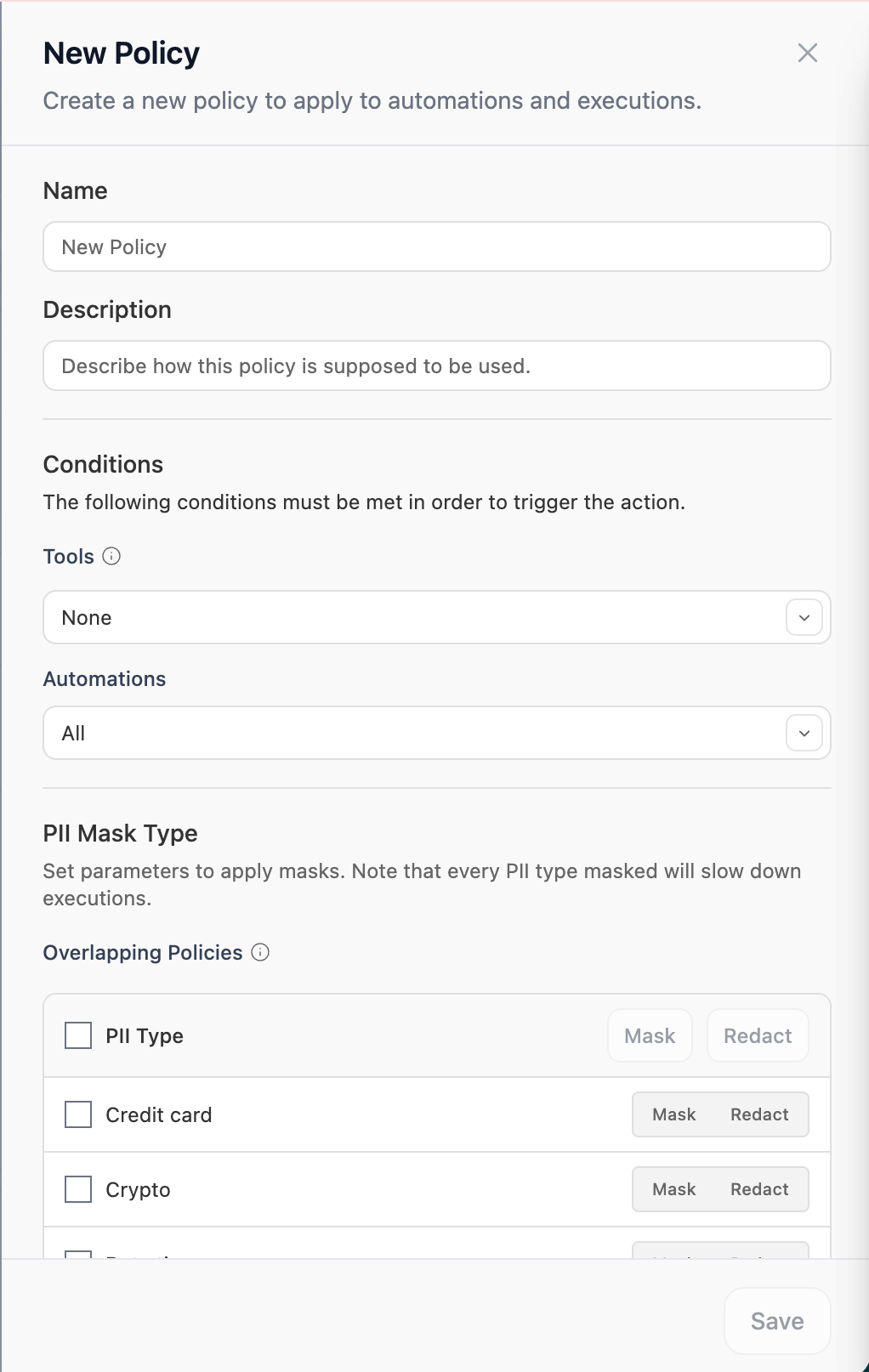
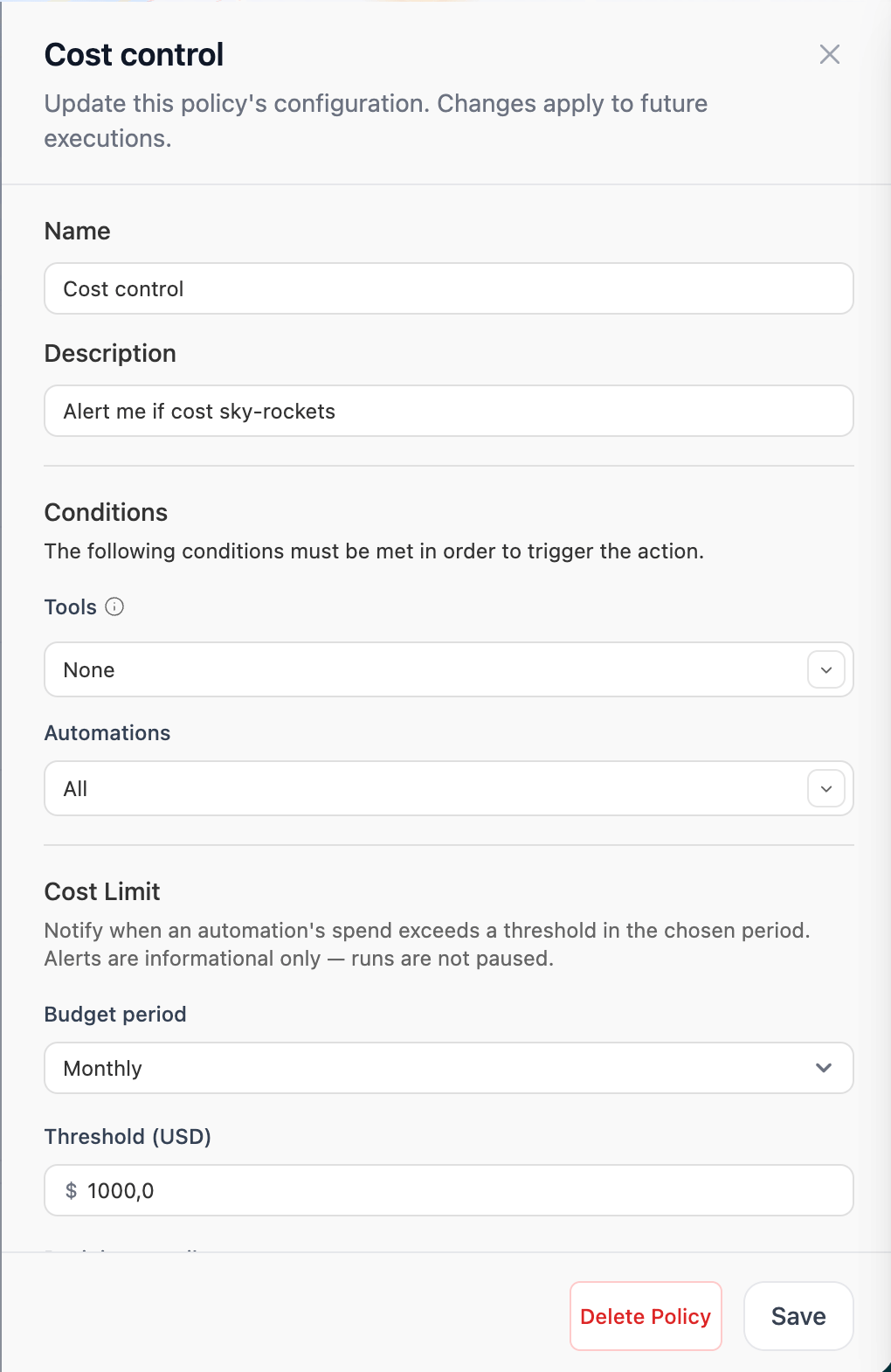 Click **+ Create new** at the top-right of the Policies tab, or **View Details** on an existing policy card.
Give the policy a clear name (e.g. *Mask PII (CC)* or *Monthly \$100 budget*) and a description explaining when it applies. Both show up on the policy card and in the Engaged Automations modal.
Choose **PII Redaction** or **Cost Limit**. The type determines which configuration section appears below the conditions. The type is fixed once the policy is created — to switch, create a new policy.
Conditions decide which automations the policy engages with. Both are optional and use **set-equality** semantics:
* **Tools** — only automations whose tool set **exactly matches** the selected tools will engage. Picks from Studio apps, MCPs, OSS tools, and Tool Repository registry tools.
* **Automations** — only automations whose tag set **exactly matches** the selected tags will engage.
Leaving a picker empty means "no filter on this dimension". Leaving both empty means the policy applies to **every** automation in the organization.
The editor shows the configuration for the type you picked — the **PII Mask Type** table for PII Redaction, or the budget fields for Cost Limit. See [Policy types](#policy-types) for what each field does.
The policy applies to **future** executions of every engaged automation as soon as you save. No re-deploy is needed.
## Engaged automations
Click **Engaged N automations** on any policy card to see exactly which deployments the policy is currently matching, along with each one's last execution.
Click **+ Create new** at the top-right of the Policies tab, or **View Details** on an existing policy card.
Give the policy a clear name (e.g. *Mask PII (CC)* or *Monthly \$100 budget*) and a description explaining when it applies. Both show up on the policy card and in the Engaged Automations modal.
Choose **PII Redaction** or **Cost Limit**. The type determines which configuration section appears below the conditions. The type is fixed once the policy is created — to switch, create a new policy.
Conditions decide which automations the policy engages with. Both are optional and use **set-equality** semantics:
* **Tools** — only automations whose tool set **exactly matches** the selected tools will engage. Picks from Studio apps, MCPs, OSS tools, and Tool Repository registry tools.
* **Automations** — only automations whose tag set **exactly matches** the selected tags will engage.
Leaving a picker empty means "no filter on this dimension". Leaving both empty means the policy applies to **every** automation in the organization.
The editor shows the configuration for the type you picked — the **PII Mask Type** table for PII Redaction, or the budget fields for Cost Limit. See [Policy types](#policy-types) for what each field does.
The policy applies to **future** executions of every engaged automation as soon as you save. No re-deploy is needed.
## Engaged automations
Click **Engaged N automations** on any policy card to see exactly which deployments the policy is currently matching, along with each one's last execution.
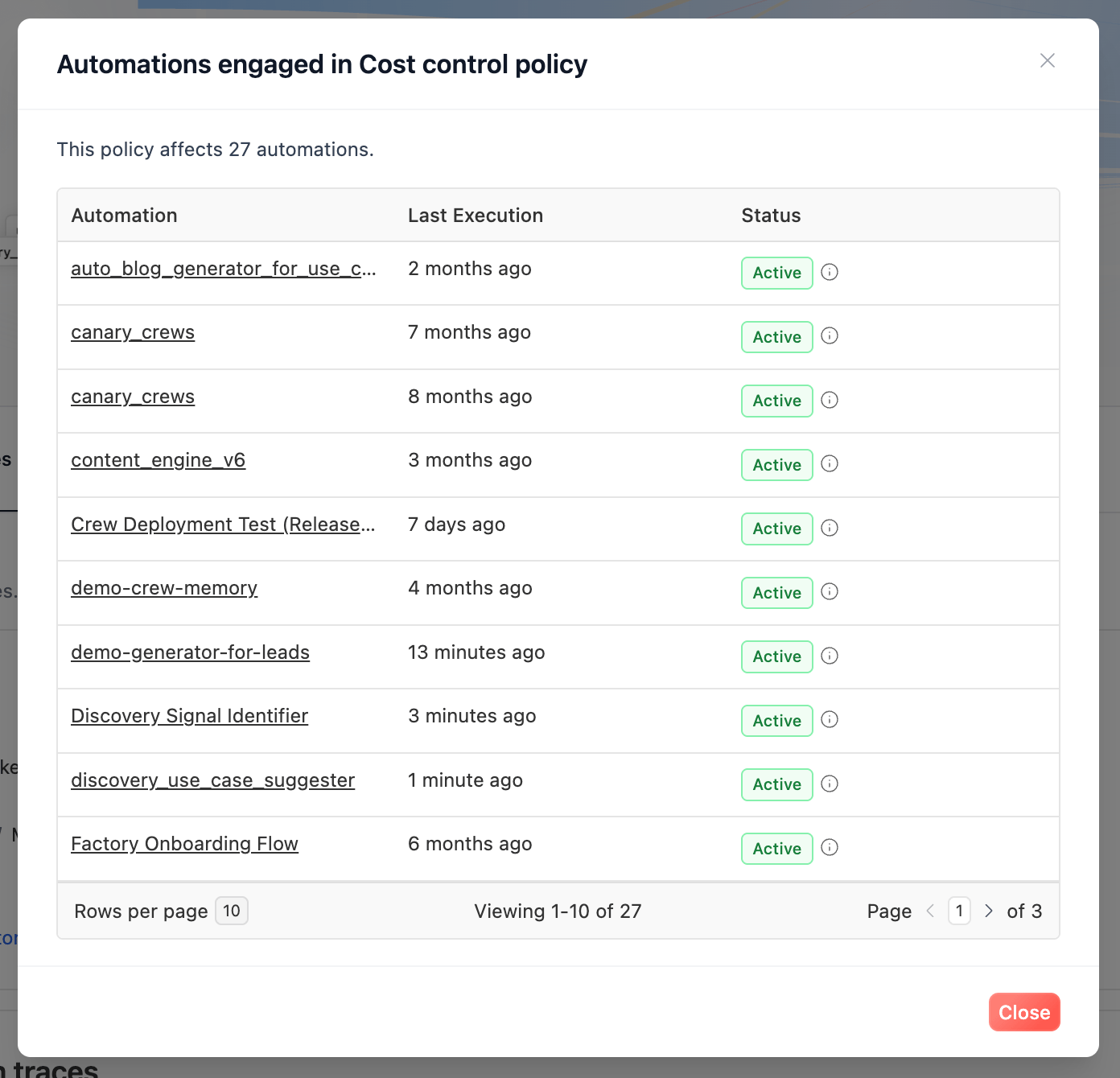 This is the fastest way to sanity-check a policy's scope before enabling it — for example, to confirm that a policy scoped to the `production` tag isn't accidentally matching a staging deployment.
## Org-wide policies vs per-deployment settings
Both PII Redaction and Cost Limit can be configured in two places: org-wide as a Policy on this page, or per-deployment under that deployment's **Settings**. When an enabled org-wide policy's scope matches a deployment, the policy takes precedence over the deployment-owned setting while it's attached.
| Policy | Per-deployment setting | What an attached org-wide policy does |
| ----------------- | ------------------------------------------------------------------------------------- | ---------------------------------------------------------------------------------------------------------------------------------------------------- |
| **PII Redaction** | **Settings → PII Protection** ([guide](/en/enterprise/features/pii-trace-redactions)) | The policy's entity configuration **overrides** the deployment's PII settings for that deployment's executions. |
| **Cost Limit** | **Settings → Cost Alerts** | The deployment's manual cost alert is **paused** and the attached cost policy(s) fire instead. The per-deployment form stays editable as a fallback. |
Disable or detach the policy (or change its scope so it no longer matches) and the deployment falls back to its own per-deployment settings.
Prefer org-wide policies when you want to enforce a consistent policy across many deployments; reserve per-deployment configuration for one-off exceptions.
## Related
What ACP is, requirements, plan tiers, and RBAC.
Monitor automations and LLM consumption across your fleet.
Entity catalog, custom recognizers, and per-deployment configuration.
Manage who can create or edit policies.
Contact our support team for help designing policies for your organization.
This is the fastest way to sanity-check a policy's scope before enabling it — for example, to confirm that a policy scoped to the `production` tag isn't accidentally matching a staging deployment.
## Org-wide policies vs per-deployment settings
Both PII Redaction and Cost Limit can be configured in two places: org-wide as a Policy on this page, or per-deployment under that deployment's **Settings**. When an enabled org-wide policy's scope matches a deployment, the policy takes precedence over the deployment-owned setting while it's attached.
| Policy | Per-deployment setting | What an attached org-wide policy does |
| ----------------- | ------------------------------------------------------------------------------------- | ---------------------------------------------------------------------------------------------------------------------------------------------------- |
| **PII Redaction** | **Settings → PII Protection** ([guide](/en/enterprise/features/pii-trace-redactions)) | The policy's entity configuration **overrides** the deployment's PII settings for that deployment's executions. |
| **Cost Limit** | **Settings → Cost Alerts** | The deployment's manual cost alert is **paused** and the attached cost policy(s) fire instead. The per-deployment form stays editable as a fallback. |
Disable or detach the policy (or change its scope so it no longer matches) and the deployment falls back to its own per-deployment settings.
Prefer org-wide policies when you want to enforce a consistent policy across many deployments; reserve per-deployment configuration for one-off exceptions.
## Related
What ACP is, requirements, plan tiers, and RBAC.
Monitor automations and LLM consumption across your fleet.
Entity catalog, custom recognizers, and per-deployment configuration.
Manage who can create or edit policies.
Contact our support team for help designing policies for your organization.