> ## Documentation Index
> Fetch the complete documentation index at: https://docs.crewai.com/llms.txt
> Use this file to discover all available pages before exploring further.
# Checkpointing
> Automatically save execution state so crews, flows, and agents can resume after failures.
Checkpointing saves a snapshot of execution state during a run so a crew, flow, or agent can resume after a failure or be forked into an alternate branch.
How checkpointing works: events, storage, and inheritance.
A 5-minute walkthrough: run, interrupt, resume.
Task-focused recipes for common workflows.
`CheckpointConfig`, events, providers, and CLI.
## Explanation
### What a checkpoint is
A checkpoint captures everything CrewAI needs to recreate a run mid-flight: the full state of the crew, flow, or agent — configuration, agent memory and knowledge sources, task progress, intermediate outputs, internal state and attributes — alongside the kickoff inputs, the event history up to that point, and a lineage ID that ties the checkpoint to the run it came from.
Restoring rebuilds that state and continues. Completed tasks are skipped, memory and knowledge are rehydrated, and downstream work runs against the same outputs the original run produced. Forking does the same restore under a new lineage, so the new branch and the original run can write checkpoints side by side without overwriting each other.
### When checkpoints are written
Checkpointing is event-driven. The runtime subscribes to events you select via `on_events` and writes a checkpoint each time one fires. The default `task_completed` produces one checkpoint per finished task — a sensible tradeoff between granularity and disk use. Higher-frequency events like `llm_call_completed` are available for fine-grained recovery but write far more files.
### Storage
Two providers ship with CrewAI:
* `JsonProvider` writes one file per checkpoint. Human-readable and easy to inspect.
* `SqliteProvider` writes to a single SQLite database. Better for high-frequency checkpointing.
Both prune oldest checkpoints when `max_checkpoints` is set.
Auto-checkpoint writes (event-driven) are best-effort: a failed write is logged and the run continues. Manual `state.checkpoint()` and `state.acheckpoint()` calls re-raise on failure.
### Inheritance model
`Crew`, `Flow`, and `Agent` all accept a `checkpoint` argument. Children inherit from their parent unless they set their own value or pass `False` to opt out. Enable checkpointing once on the crew and every agent participates, or selectively exclude one agent.
## Tutorial: Resume a failing crew
This walkthrough takes \~5 minutes. You will run a two-task crew, kill it midway, and resume from the saved checkpoint.
```python theme={null}
from crewai import Agent, Crew, Task
researcher = Agent(role="Researcher", goal="Research", backstory="Expert")
writer = Agent(role="Writer", goal="Write", backstory="Expert")
crew = Crew(
agents=[researcher, writer],
tasks=[
Task(description="Research AI trends", agent=researcher, expected_output="bullets"),
Task(description="Write a summary", agent=writer, expected_output="paragraph"),
],
checkpoint=True,
)
```
```python theme={null}
result = crew.kickoff()
```
Press `Ctrl+C` after the first task finishes. Look in `./.checkpoints/` — a file named `_.json` is the checkpoint.
```python theme={null}
from crewai import CheckpointConfig
result = crew.kickoff(
from_checkpoint=CheckpointConfig(
restore_from="./.checkpoints/_.json",
),
)
```
The research task is skipped, the writer runs against the saved research output, and the crew finishes.
## How-to guides
```python theme={null}
crew = Crew(agents=[...], tasks=[...], checkpoint=True)
```
Writes to `./.checkpoints/` on every `task_completed`.
```python theme={null}
from crewai import Crew, CheckpointConfig
crew = Crew(
agents=[...],
tasks=[...],
checkpoint=CheckpointConfig(
location="./my_checkpoints",
on_events=["task_completed", "crew_kickoff_completed"],
max_checkpoints=5,
),
)
```
```python JsonProvider theme={null}
from crewai import Crew, CheckpointConfig
from crewai.state import JsonProvider
crew = Crew(
agents=[...],
tasks=[...],
checkpoint=CheckpointConfig(
location="./my_checkpoints",
provider=JsonProvider(),
max_checkpoints=5,
),
)
```
```python SqliteProvider theme={null}
from crewai import Crew, CheckpointConfig
from crewai.state import SqliteProvider
crew = Crew(
agents=[...],
tasks=[...],
checkpoint=CheckpointConfig(
location="./.checkpoints.db",
provider=SqliteProvider(),
max_checkpoints=50,
),
)
```
SQLite enables WAL journal mode for concurrent reads. Prefer it for high-frequency checkpointing.
```python theme={null}
crew = Crew(
agents=[
Agent(role="Researcher", ...),
Agent(role="Writer", ..., checkpoint=False),
],
tasks=[...],
checkpoint=True,
)
```
`fork()` restores a checkpoint under a fresh lineage so the new run does not collide with the original.
```python theme={null}
config = CheckpointConfig(restore_from="./my_checkpoints/.json")
crew = Crew.fork(config, branch="experiment-a")
result = crew.kickoff(inputs={"strategy": "aggressive"})
```
The `branch` label is optional; one is generated if omitted.
```python theme={null}
crew = Crew(
agents=[researcher, writer],
tasks=[research_task, write_task, review_task],
checkpoint=CheckpointConfig(location="./crew_cp"),
)
```
Default trigger: `task_completed`.
```python theme={null}
from crewai.flow.flow import Flow, start, listen
from crewai import CheckpointConfig
class MyFlow(Flow):
@start()
def step_one(self):
return "data"
@listen(step_one)
def step_two(self, data):
return process(data)
flow = MyFlow(
checkpoint=CheckpointConfig(
location="./flow_cp",
on_events=["method_execution_finished"],
),
)
result = flow.kickoff()
```
```python theme={null}
agent = Agent(
role="Researcher",
goal="Research topics",
backstory="Expert researcher",
checkpoint=CheckpointConfig(
location="./agent_cp",
on_events=["lite_agent_execution_completed"],
),
)
result = agent.kickoff(messages=[{"role": "user", "content": "Research AI trends"}])
```
Register a handler on any event and call `state.checkpoint()`.
```python Sync theme={null}
from __future__ import annotations
from typing import TYPE_CHECKING, Any
from crewai.events.event_bus import crewai_event_bus
from crewai.events.types.llm_events import LLMCallCompletedEvent
if TYPE_CHECKING:
from crewai.state.runtime import RuntimeState
@crewai_event_bus.on(LLMCallCompletedEvent)
def on_llm_done(source: Any, event: LLMCallCompletedEvent, state: RuntimeState) -> None:
path = state.checkpoint("./my_checkpoints")
print(f"Saved checkpoint: {path}")
```
```python Async theme={null}
from __future__ import annotations
from typing import TYPE_CHECKING, Any
from crewai.events.event_bus import crewai_event_bus
from crewai.events.types.llm_events import LLMCallCompletedEvent
if TYPE_CHECKING:
from crewai.state.runtime import RuntimeState
@crewai_event_bus.on(LLMCallCompletedEvent)
async def on_llm_done_async(source: Any, event: LLMCallCompletedEvent, state: RuntimeState) -> None:
path = await state.acheckpoint("./my_checkpoints")
print(f"Saved checkpoint: {path}")
```
A `state` argument is supplied automatically when the handler takes three parameters. See [Event Listeners](/en/concepts/event-listener) for the full event catalog.
```bash theme={null}
crewai checkpoint
crewai checkpoint --location ./my_checkpoints
crewai checkpoint --location ./.checkpoints.db
```
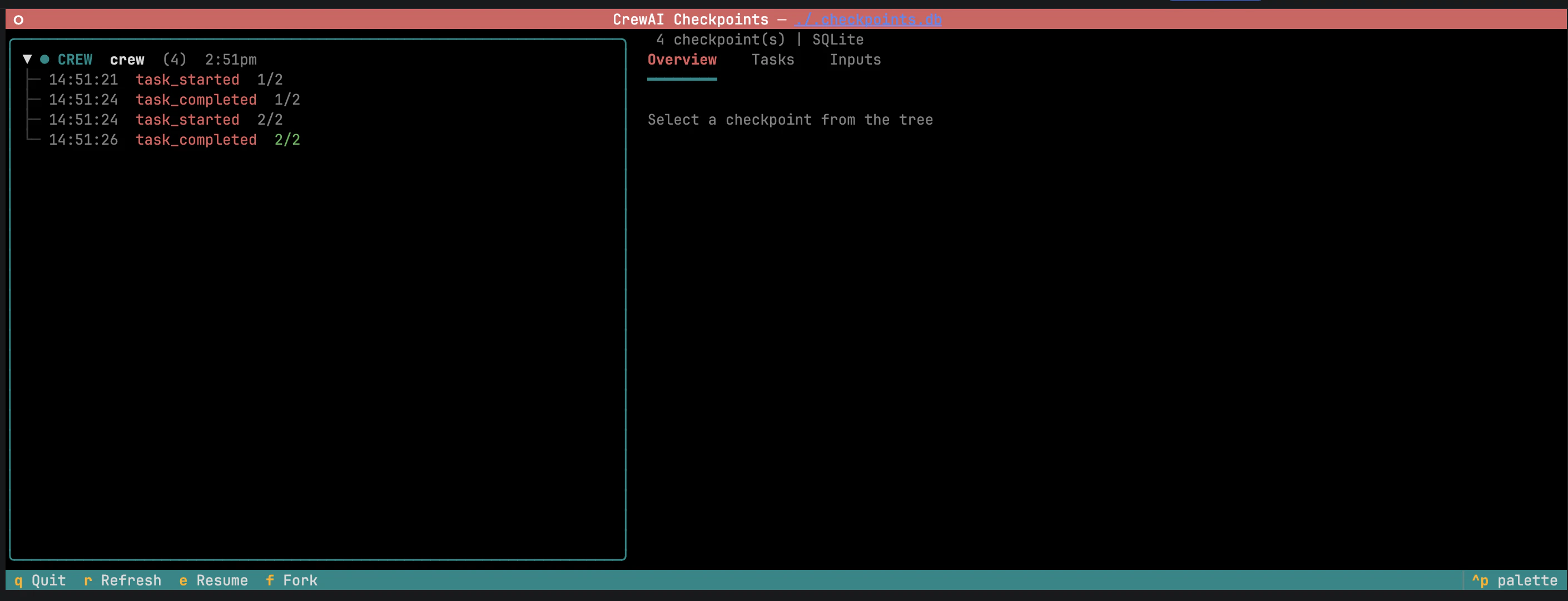 The left panel groups checkpoints by branch; forks nest under their parent. Selecting a checkpoint opens the detail panel with metadata, entity state, and task progress. **Resume** continues the run; **Fork** starts a new branch.
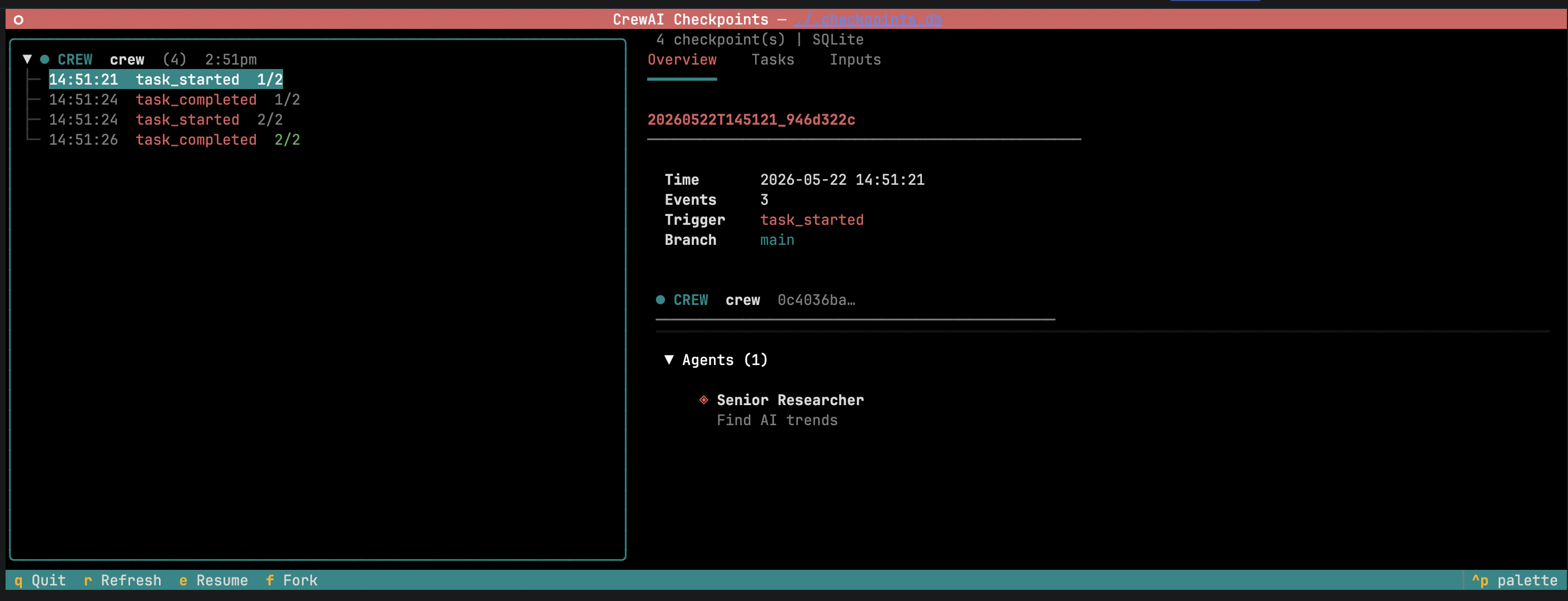 The detail panel exposes two editable areas:
* **Inputs** — original kickoff inputs, pre-filled and editable.
The detail panel exposes two editable areas:
* **Inputs** — original kickoff inputs, pre-filled and editable.
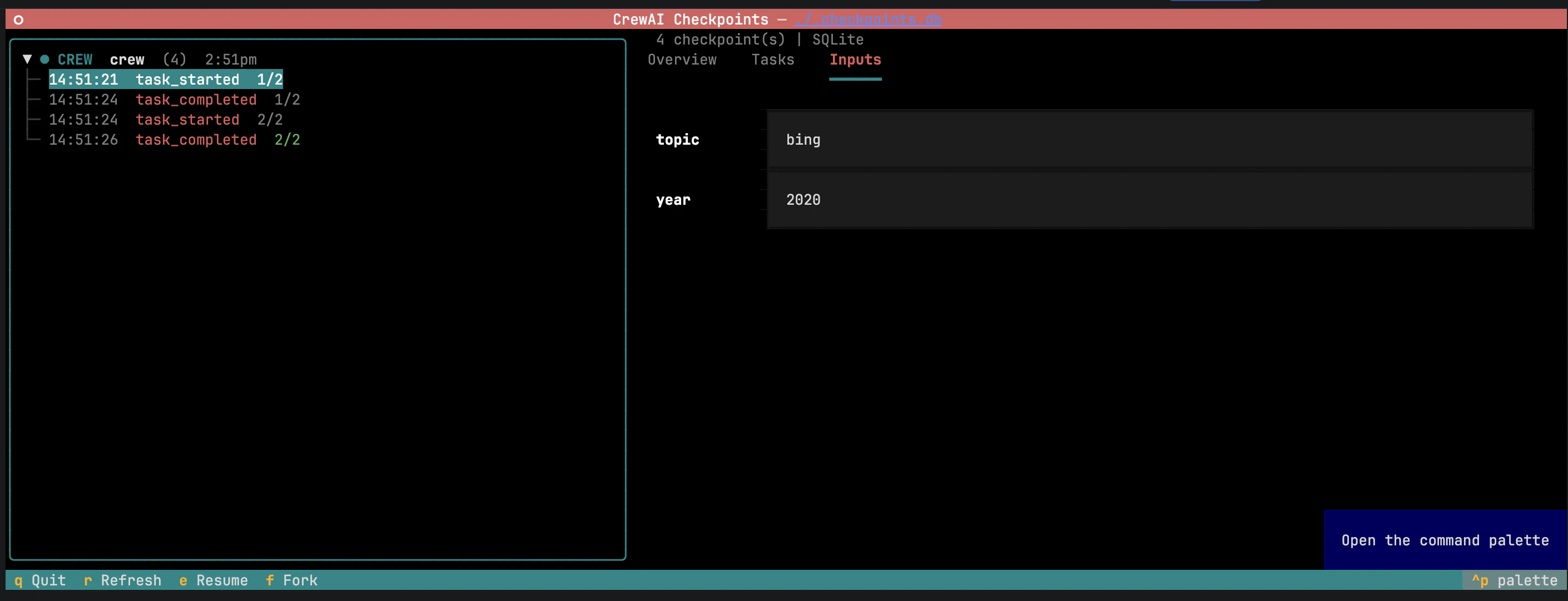 * **Task outputs** — outputs of completed tasks. Editing an output and hitting **Fork** invalidates downstream tasks so they re-run against the modified context.
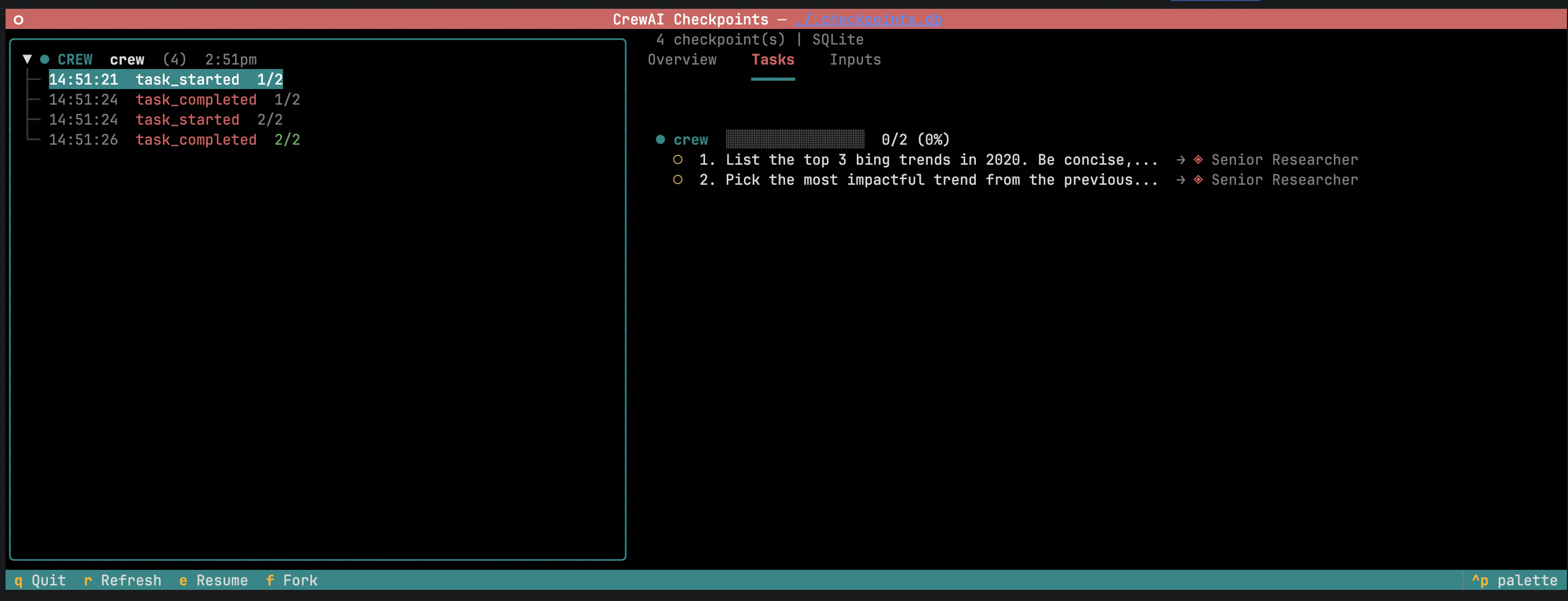
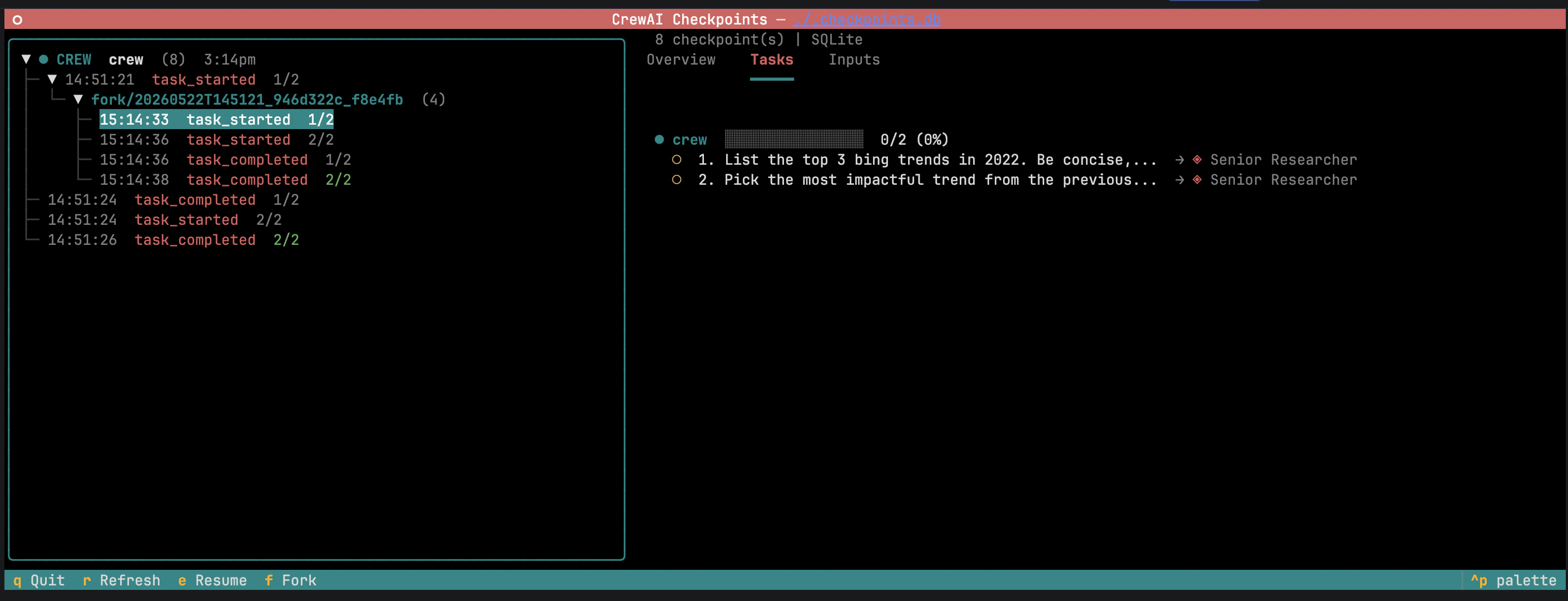 Useful for "what if" exploration: fork, tweak, observe.
```bash theme={null}
crewai checkpoint list ./my_checkpoints
crewai checkpoint info ./my_checkpoints/.json
crewai checkpoint info ./.checkpoints.db
```
## Reference
### `CheckpointConfig`
Storage destination. A directory for `JsonProvider`, a database file path for `SqliteProvider`.
Event types that trigger a checkpoint. `CheckpointEventType` is a `Literal` — your type checker will autocomplete and reject unsupported values. See [event types](#event-types) for the full list.
Storage backend. Either `JsonProvider` or `SqliteProvider`.
Maximum checkpoints to retain. Oldest are pruned after each write.
Checkpoint to restore from when passed via `from_checkpoint`.
### `checkpoint` field values
Accepted by `Crew`, `Flow`, and `Agent`.
Inherit from parent.
Enable with defaults.
Explicit opt-out. Stops inheritance.
Custom configuration.
### Event types
`on_events` accepts any combination of `CheckpointEventType` values. The default `["task_completed"]` writes one checkpoint per finished task; `["*"]` matches every event.
`["*"]` and high-frequency events like `llm_call_completed` write many checkpoints and can degrade performance. Pair them with `max_checkpoints`.
* **Task** — `task_started`, `task_completed`, `task_failed`, `task_evaluation`
* **Crew** — `crew_kickoff_started`, `crew_kickoff_completed`, `crew_kickoff_failed`, `crew_train_started`, `crew_train_completed`, `crew_train_failed`, `crew_test_started`, `crew_test_completed`, `crew_test_failed`, `crew_test_result`
* **Agent** — `agent_execution_started`, `agent_execution_completed`, `agent_execution_error`, `lite_agent_execution_started`, `lite_agent_execution_completed`, `lite_agent_execution_error`, `agent_evaluation_started`, `agent_evaluation_completed`, `agent_evaluation_failed`
* **Flow** — `flow_created`, `flow_started`, `flow_finished`, `flow_paused`, `method_execution_started`, `method_execution_finished`, `method_execution_failed`, `method_execution_paused`, `human_feedback_requested`, `human_feedback_received`, `flow_input_requested`, `flow_input_received`
* **LLM** — `llm_call_started`, `llm_call_completed`, `llm_call_failed`, `llm_stream_chunk`, `llm_thinking_chunk`
* **LLM Guardrail** — `llm_guardrail_started`, `llm_guardrail_completed`, `llm_guardrail_failed`
* **Tool** — `tool_usage_started`, `tool_usage_finished`, `tool_usage_error`, `tool_validate_input_error`, `tool_selection_error`, `tool_execution_error`
* **Memory** — `memory_save_started`, `memory_save_completed`, `memory_save_failed`, `memory_query_started`, `memory_query_completed`, `memory_query_failed`, `memory_retrieval_started`, `memory_retrieval_completed`, `memory_retrieval_failed`
* **Knowledge** — `knowledge_search_query_started`, `knowledge_search_query_completed`, `knowledge_query_started`, `knowledge_query_completed`, `knowledge_query_failed`, `knowledge_search_query_failed`
* **Reasoning** — `agent_reasoning_started`, `agent_reasoning_completed`, `agent_reasoning_failed`
* **MCP** — `mcp_connection_started`, `mcp_connection_completed`, `mcp_connection_failed`, `mcp_tool_execution_started`, `mcp_tool_execution_completed`, `mcp_tool_execution_failed`, `mcp_config_fetch_failed`
* **Observation** — `step_observation_started`, `step_observation_completed`, `step_observation_failed`, `plan_refinement`, `plan_replan_triggered`, `goal_achieved_early`
* **Skill** — `skill_discovery_started`, `skill_discovery_completed`, `skill_loaded`, `skill_activated`, `skill_load_failed`
* **Logging** — `agent_logs_started`, `agent_logs_execution`
* **A2A** — `a2a_delegation_started`, `a2a_delegation_completed`, `a2a_conversation_started`, `a2a_conversation_completed`, `a2a_message_sent`, `a2a_response_received`, `a2a_polling_started`, `a2a_polling_status`, `a2a_push_notification_registered`, `a2a_push_notification_received`, `a2a_push_notification_sent`, `a2a_push_notification_timeout`, `a2a_streaming_started`, `a2a_streaming_chunk`, `a2a_agent_card_fetched`, `a2a_authentication_failed`, `a2a_artifact_received`, `a2a_connection_error`, `a2a_server_task_started`, `a2a_server_task_completed`, `a2a_server_task_canceled`, `a2a_server_task_failed`, `a2a_parallel_delegation_started`, `a2a_parallel_delegation_completed`, `a2a_transport_negotiated`, `a2a_content_type_negotiated`, `a2a_context_created`, `a2a_context_expired`, `a2a_context_idle`, `a2a_context_completed`, `a2a_context_pruned`
* **System signals** — `SIGTERM`, `SIGINT`, `SIGHUP`, `SIGTSTP`, `SIGCONT`
* **Wildcard** — `"*"` matches every event.
### Storage providers
One file per checkpoint, named `_.json` inside `location`.
Single database file at `location` with WAL journaling.
### CLI
| Command | Purpose |
| :------------------------------------ | :------------------------------------------------------------------ |
| `crewai checkpoint` | Launch the TUI; auto-detect storage. |
| `crewai checkpoint --location ` | Launch the TUI against a specific location. |
| `crewai checkpoint list ` | List checkpoints. |
| `crewai checkpoint info ` | Inspect a checkpoint file or the latest entry in a SQLite database. |
Useful for "what if" exploration: fork, tweak, observe.
```bash theme={null}
crewai checkpoint list ./my_checkpoints
crewai checkpoint info ./my_checkpoints/.json
crewai checkpoint info ./.checkpoints.db
```
## Reference
### `CheckpointConfig`
Storage destination. A directory for `JsonProvider`, a database file path for `SqliteProvider`.
Event types that trigger a checkpoint. `CheckpointEventType` is a `Literal` — your type checker will autocomplete and reject unsupported values. See [event types](#event-types) for the full list.
Storage backend. Either `JsonProvider` or `SqliteProvider`.
Maximum checkpoints to retain. Oldest are pruned after each write.
Checkpoint to restore from when passed via `from_checkpoint`.
### `checkpoint` field values
Accepted by `Crew`, `Flow`, and `Agent`.
Inherit from parent.
Enable with defaults.
Explicit opt-out. Stops inheritance.
Custom configuration.
### Event types
`on_events` accepts any combination of `CheckpointEventType` values. The default `["task_completed"]` writes one checkpoint per finished task; `["*"]` matches every event.
`["*"]` and high-frequency events like `llm_call_completed` write many checkpoints and can degrade performance. Pair them with `max_checkpoints`.
* **Task** — `task_started`, `task_completed`, `task_failed`, `task_evaluation`
* **Crew** — `crew_kickoff_started`, `crew_kickoff_completed`, `crew_kickoff_failed`, `crew_train_started`, `crew_train_completed`, `crew_train_failed`, `crew_test_started`, `crew_test_completed`, `crew_test_failed`, `crew_test_result`
* **Agent** — `agent_execution_started`, `agent_execution_completed`, `agent_execution_error`, `lite_agent_execution_started`, `lite_agent_execution_completed`, `lite_agent_execution_error`, `agent_evaluation_started`, `agent_evaluation_completed`, `agent_evaluation_failed`
* **Flow** — `flow_created`, `flow_started`, `flow_finished`, `flow_paused`, `method_execution_started`, `method_execution_finished`, `method_execution_failed`, `method_execution_paused`, `human_feedback_requested`, `human_feedback_received`, `flow_input_requested`, `flow_input_received`
* **LLM** — `llm_call_started`, `llm_call_completed`, `llm_call_failed`, `llm_stream_chunk`, `llm_thinking_chunk`
* **LLM Guardrail** — `llm_guardrail_started`, `llm_guardrail_completed`, `llm_guardrail_failed`
* **Tool** — `tool_usage_started`, `tool_usage_finished`, `tool_usage_error`, `tool_validate_input_error`, `tool_selection_error`, `tool_execution_error`
* **Memory** — `memory_save_started`, `memory_save_completed`, `memory_save_failed`, `memory_query_started`, `memory_query_completed`, `memory_query_failed`, `memory_retrieval_started`, `memory_retrieval_completed`, `memory_retrieval_failed`
* **Knowledge** — `knowledge_search_query_started`, `knowledge_search_query_completed`, `knowledge_query_started`, `knowledge_query_completed`, `knowledge_query_failed`, `knowledge_search_query_failed`
* **Reasoning** — `agent_reasoning_started`, `agent_reasoning_completed`, `agent_reasoning_failed`
* **MCP** — `mcp_connection_started`, `mcp_connection_completed`, `mcp_connection_failed`, `mcp_tool_execution_started`, `mcp_tool_execution_completed`, `mcp_tool_execution_failed`, `mcp_config_fetch_failed`
* **Observation** — `step_observation_started`, `step_observation_completed`, `step_observation_failed`, `plan_refinement`, `plan_replan_triggered`, `goal_achieved_early`
* **Skill** — `skill_discovery_started`, `skill_discovery_completed`, `skill_loaded`, `skill_activated`, `skill_load_failed`
* **Logging** — `agent_logs_started`, `agent_logs_execution`
* **A2A** — `a2a_delegation_started`, `a2a_delegation_completed`, `a2a_conversation_started`, `a2a_conversation_completed`, `a2a_message_sent`, `a2a_response_received`, `a2a_polling_started`, `a2a_polling_status`, `a2a_push_notification_registered`, `a2a_push_notification_received`, `a2a_push_notification_sent`, `a2a_push_notification_timeout`, `a2a_streaming_started`, `a2a_streaming_chunk`, `a2a_agent_card_fetched`, `a2a_authentication_failed`, `a2a_artifact_received`, `a2a_connection_error`, `a2a_server_task_started`, `a2a_server_task_completed`, `a2a_server_task_canceled`, `a2a_server_task_failed`, `a2a_parallel_delegation_started`, `a2a_parallel_delegation_completed`, `a2a_transport_negotiated`, `a2a_content_type_negotiated`, `a2a_context_created`, `a2a_context_expired`, `a2a_context_idle`, `a2a_context_completed`, `a2a_context_pruned`
* **System signals** — `SIGTERM`, `SIGINT`, `SIGHUP`, `SIGTSTP`, `SIGCONT`
* **Wildcard** — `"*"` matches every event.
### Storage providers
One file per checkpoint, named `_.json` inside `location`.
Single database file at `location` with WAL journaling.
### CLI
| Command | Purpose |
| :------------------------------------ | :------------------------------------------------------------------ |
| `crewai checkpoint` | Launch the TUI; auto-detect storage. |
| `crewai checkpoint --location ` | Launch the TUI against a specific location. |
| `crewai checkpoint list ` | List checkpoints. |
| `crewai checkpoint info ` | Inspect a checkpoint file or the latest entry in a SQLite database. |