> ## Documentation Index
> Fetch the complete documentation index at: https://docs.crewai.com/llms.txt
> Use this file to discover all available pages before exploring further.
# HITL Workflows
> Learn how to implement Human-In-The-Loop workflows in CrewAI for enhanced decision-making
Human-In-The-Loop (HITL) is a powerful approach that combines artificial intelligence with human expertise to enhance decision-making and improve task outcomes. This guide shows you how to implement HITL within CrewAI Enterprise.
## HITL Approaches in CrewAI
CrewAI offers two approaches for implementing human-in-the-loop workflows:
| Approach | Best For | Version |
| -------------------------------------------- | ---------------------------------------------------------------------------- | ------------ |
| **Flow-based** (`@human_feedback` decorator) | Production with Enterprise UI, email-first workflows, full platform features | **1.8.0+** |
| **Webhook-based** | Custom integrations, external systems (Slack, Teams, etc.), legacy setups | All versions |
## Flow-Based HITL with Enterprise Platform
The `@human_feedback` decorator requires **CrewAI version 1.8.0 or higher**.
When using the `@human_feedback` decorator in your Flows, CrewAI Enterprise provides an **email-first HITL system** that enables anyone with an email address to respond to review requests:
Responders receive email notifications and can reply directly—no login required.
Review and respond to HITL requests in the Enterprise dashboard when preferred.
Route requests to specific emails based on method patterns or pull from flow state.
Configure automatic fallback responses when no human replies within the timeout.
### Key Benefits
* **External responders**: Anyone with an email can respond, even non-platform users
* **Dynamic assignment**: Pull assignee email from flow state (e.g., `account_owner_email`)
* **Simple configuration**: Email-based routing is easier to set up than user/role management
* **Deployment creator fallback**: If no routing rule matches, the deployment creator is notified
For implementation details on the `@human_feedback` decorator, see the [Human Feedback in Flows](/en/learn/human-feedback-in-flows) guide.
## Setting Up Webhook-Based HITL Workflows
For custom integrations with external systems like Slack, Microsoft Teams, or your own applications, you can use the webhook-based approach:
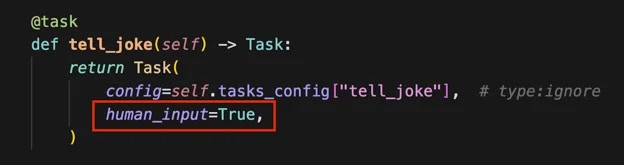
Set up your task with human input enabled:
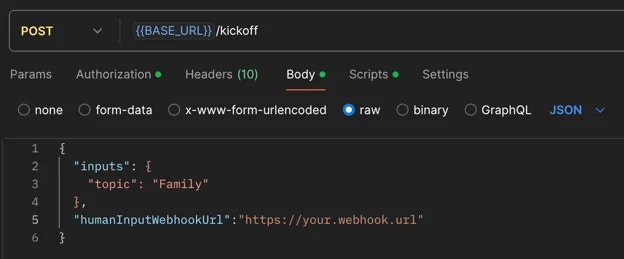
 When kicking off your crew, include a webhook URL for human input:
 Once the crew completes the task requiring human input, you'll receive a webhook notification containing:
* **Execution ID**
* **Task ID**
* **Task output**
The system will pause in the `Pending Human Input` state. Review the task output carefully.
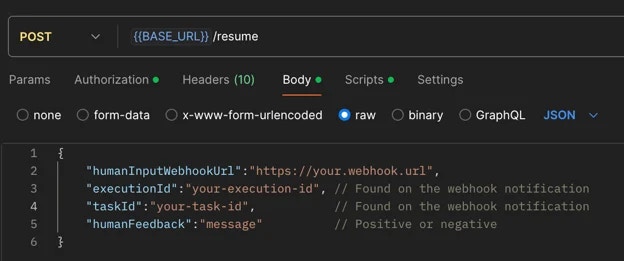
Call the resume endpoint of your crew with the following information:
Once the crew completes the task requiring human input, you'll receive a webhook notification containing:
* **Execution ID**
* **Task ID**
* **Task output**
The system will pause in the `Pending Human Input` state. Review the task output carefully.
Call the resume endpoint of your crew with the following information:
 **Critical: Webhook URLs Must Be Provided Again**:
You **must** provide the same webhook URLs (`taskWebhookUrl`, `stepWebhookUrl`, `crewWebhookUrl`) in the resume call that you used in the kickoff call. Webhook configurations are **NOT** automatically carried over from kickoff - they must be explicitly included in the resume request to continue receiving notifications for task completion, agent steps, and crew completion.
Example resume call with webhooks:
```bash theme={null}
curl -X POST {BASE_URL}/resume \
-H "Authorization: Bearer YOUR_API_TOKEN" \
-H "Content-Type: application/json" \
-d '{
"execution_id": "abcd1234-5678-90ef-ghij-klmnopqrstuv",
"task_id": "research_task",
"human_feedback": "Great work! Please add more details.",
"is_approve": true,
"taskWebhookUrl": "https://your-server.com/webhooks/task",
"stepWebhookUrl": "https://your-server.com/webhooks/step",
"crewWebhookUrl": "https://your-server.com/webhooks/crew"
}'
```
**Feedback Impact on Task Execution**:
It's crucial to exercise care when providing feedback, as the entire feedback content will be incorporated as additional context for further task executions.
This means:
* All information in your feedback becomes part of the task's context.
* Irrelevant details may negatively influence it.
* Concise, relevant feedback helps maintain task focus and efficiency.
* Always review your feedback carefully before submission to ensure it contains only pertinent information that will positively guide the task's execution.
If you provide negative feedback:
* The crew will retry the task with added context from your feedback.
* You'll receive another webhook notification for further review.
* Repeat steps 4-6 until satisfied.
When you submit positive feedback, the execution will proceed to the next steps.
## Best Practices
* **Be Specific**: Provide clear, actionable feedback that directly addresses the task at hand
* **Stay Relevant**: Only include information that will help improve the task execution
* **Be Timely**: Respond to HITL prompts promptly to avoid workflow delays
* **Review Carefully**: Double-check your feedback before submitting to ensure accuracy
## Common Use Cases
HITL workflows are particularly valuable for:
* Quality assurance and validation
* Complex decision-making scenarios
* Sensitive or high-stakes operations
* Creative tasks requiring human judgment
* Compliance and regulatory reviews
## Learn More
Explore the full Enterprise Flow HITL platform capabilities including email notifications, routing rules, auto-response, and analytics.
Implementation guide for the `@human_feedback` decorator in your Flows.
**Critical: Webhook URLs Must Be Provided Again**:
You **must** provide the same webhook URLs (`taskWebhookUrl`, `stepWebhookUrl`, `crewWebhookUrl`) in the resume call that you used in the kickoff call. Webhook configurations are **NOT** automatically carried over from kickoff - they must be explicitly included in the resume request to continue receiving notifications for task completion, agent steps, and crew completion.
Example resume call with webhooks:
```bash theme={null}
curl -X POST {BASE_URL}/resume \
-H "Authorization: Bearer YOUR_API_TOKEN" \
-H "Content-Type: application/json" \
-d '{
"execution_id": "abcd1234-5678-90ef-ghij-klmnopqrstuv",
"task_id": "research_task",
"human_feedback": "Great work! Please add more details.",
"is_approve": true,
"taskWebhookUrl": "https://your-server.com/webhooks/task",
"stepWebhookUrl": "https://your-server.com/webhooks/step",
"crewWebhookUrl": "https://your-server.com/webhooks/crew"
}'
```
**Feedback Impact on Task Execution**:
It's crucial to exercise care when providing feedback, as the entire feedback content will be incorporated as additional context for further task executions.
This means:
* All information in your feedback becomes part of the task's context.
* Irrelevant details may negatively influence it.
* Concise, relevant feedback helps maintain task focus and efficiency.
* Always review your feedback carefully before submission to ensure it contains only pertinent information that will positively guide the task's execution.
If you provide negative feedback:
* The crew will retry the task with added context from your feedback.
* You'll receive another webhook notification for further review.
* Repeat steps 4-6 until satisfied.
When you submit positive feedback, the execution will proceed to the next steps.
## Best Practices
* **Be Specific**: Provide clear, actionable feedback that directly addresses the task at hand
* **Stay Relevant**: Only include information that will help improve the task execution
* **Be Timely**: Respond to HITL prompts promptly to avoid workflow delays
* **Review Carefully**: Double-check your feedback before submitting to ensure accuracy
## Common Use Cases
HITL workflows are particularly valuable for:
* Quality assurance and validation
* Complex decision-making scenarios
* Sensitive or high-stakes operations
* Creative tasks requiring human judgment
* Compliance and regulatory reviews
## Learn More
Explore the full Enterprise Flow HITL platform capabilities including email notifications, routing rules, auto-response, and analytics.
Implementation guide for the `@human_feedback` decorator in your Flows.