> ## Documentation Index
> Fetch the complete documentation index at: https://docs.crewai.com/llms.txt
> Use this file to discover all available pages before exploring further.
# Human-in-the-Loop (HITL) Workflows
> Learn how to implement Human-in-the-Loop workflows in CrewAI for enhanced decision-making
Human-in-the-Loop (HITL) is a powerful approach that combines artificial intelligence with human expertise to enhance decision-making and improve task outcomes. CrewAI provides multiple ways to implement HITL depending on your needs.
## Choosing Your HITL Approach
CrewAI offers two main approaches for implementing human-in-the-loop workflows:
| Approach | Best For | Integration | Version |
| -------------------------------------------- | ----------------------------------------------------------------------------------- | ------------------------------------------------------------ | ---------- |
| **Flow-based** (`@human_feedback` decorator) | Local development, console-based review, synchronous workflows | [Human Feedback in Flows](/en/learn/human-feedback-in-flows) | **1.8.0+** |
| **Webhook-based** (Enterprise) | Production deployments, async workflows, external integrations (Slack, Teams, etc.) | This guide | - |
If you're building flows and want to add human review steps with routing based on feedback, check out the [Human Feedback in Flows](/en/learn/human-feedback-in-flows) guide for the `@human_feedback` decorator.
## Setting Up Webhook-Based HITL Workflows
Set up your task with human input enabled:
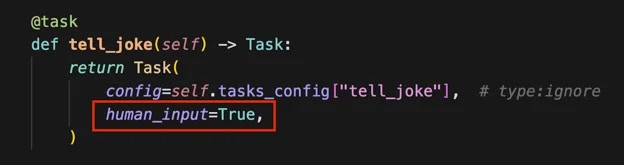 When kicking off your crew, include a webhook URL for human input:
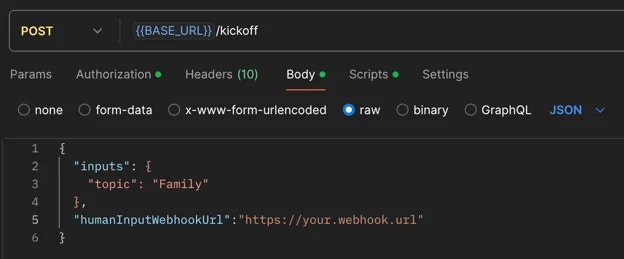 Example with Bearer authentication:
```bash theme={null}
curl -X POST {BASE_URL}/kickoff \
-H "Authorization: Bearer YOUR_API_TOKEN" \
-H "Content-Type: application/json" \
-d '{
"inputs": {
"topic": "AI Research"
},
"humanInputWebhook": {
"url": "https://your-webhook.com/hitl",
"authentication": {
"strategy": "bearer",
"token": "your-webhook-secret-token"
}
}
}'
```
Or with Basic authentication:
```bash theme={null}
curl -X POST {BASE_URL}/kickoff \
-H "Authorization: Bearer YOUR_API_TOKEN" \
-H "Content-Type: application/json" \
-d '{
"inputs": {
"topic": "AI Research"
},
"humanInputWebhook": {
"url": "https://your-webhook.com/hitl",
"authentication": {
"strategy": "basic",
"username": "your-username",
"password": "your-password"
}
}
}'
```
Once the crew completes the task requiring human input, you'll receive a webhook notification containing:
* Execution ID
* Task ID
* Task output
The system will pause in the `Pending Human Input` state. Review the task output carefully.
Call the resume endpoint of your crew with the following information:
Example with Bearer authentication:
```bash theme={null}
curl -X POST {BASE_URL}/kickoff \
-H "Authorization: Bearer YOUR_API_TOKEN" \
-H "Content-Type: application/json" \
-d '{
"inputs": {
"topic": "AI Research"
},
"humanInputWebhook": {
"url": "https://your-webhook.com/hitl",
"authentication": {
"strategy": "bearer",
"token": "your-webhook-secret-token"
}
}
}'
```
Or with Basic authentication:
```bash theme={null}
curl -X POST {BASE_URL}/kickoff \
-H "Authorization: Bearer YOUR_API_TOKEN" \
-H "Content-Type: application/json" \
-d '{
"inputs": {
"topic": "AI Research"
},
"humanInputWebhook": {
"url": "https://your-webhook.com/hitl",
"authentication": {
"strategy": "basic",
"username": "your-username",
"password": "your-password"
}
}
}'
```
Once the crew completes the task requiring human input, you'll receive a webhook notification containing:
* Execution ID
* Task ID
* Task output
The system will pause in the `Pending Human Input` state. Review the task output carefully.
Call the resume endpoint of your crew with the following information:
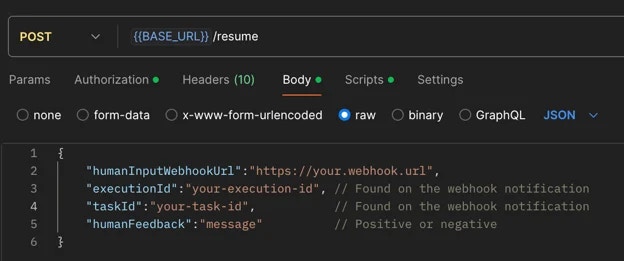 **Critical: Webhook URLs Must Be Provided Again**:
You **must** provide the same webhook URLs (`taskWebhookUrl`, `stepWebhookUrl`, `crewWebhookUrl`) in the resume call that you used in the kickoff call. Webhook configurations are **NOT** automatically carried over from kickoff - they must be explicitly included in the resume request to continue receiving notifications for task completion, agent steps, and crew completion.
Example resume call with webhooks:
```bash theme={null}
curl -X POST {BASE_URL}/resume \
-H "Authorization: Bearer YOUR_API_TOKEN" \
-H "Content-Type: application/json" \
-d '{
"execution_id": "abcd1234-5678-90ef-ghij-klmnopqrstuv",
"task_id": "research_task",
"human_feedback": "Great work! Please add more details.",
"is_approve": true,
"taskWebhookUrl": "https://your-server.com/webhooks/task",
"stepWebhookUrl": "https://your-server.com/webhooks/step",
"crewWebhookUrl": "https://your-server.com/webhooks/crew"
}'
```
**Feedback Impact on Task Execution**:
It's crucial to exercise care when providing feedback, as the entire feedback content will be incorporated as additional context for further task executions.
This means:
* All information in your feedback becomes part of the task's context.
* Irrelevant details may negatively influence it.
* Concise, relevant feedback helps maintain task focus and efficiency.
* Always review your feedback carefully before submission to ensure it contains only pertinent information that will positively guide the task's execution.
If you provide negative feedback:
* The crew will retry the task with added context from your feedback.
* You'll receive another webhook notification for further review.
* Repeat steps 4-6 until satisfied.
When you submit positive feedback, the execution will proceed to the next steps.
## Best Practices
* **Be Specific**: Provide clear, actionable feedback that directly addresses the task at hand
* **Stay Relevant**: Only include information that will help improve the task execution
* **Be Timely**: Respond to HITL prompts promptly to avoid workflow delays
* **Review Carefully**: Double-check your feedback before submitting to ensure accuracy
## Common Use Cases
HITL workflows are particularly valuable for:
* Quality assurance and validation
* Complex decision-making scenarios
* Sensitive or high-stakes operations
* Creative tasks requiring human judgment
* Compliance and regulatory reviews
## Enterprise Features
CrewAI Enterprise provides a comprehensive HITL management system for Flows with in-platform review, responder assignment, permissions, escalation policies, SLA management, dynamic routing, and full analytics. [Learn more →](/en/enterprise/features/flow-hitl-management)
**Critical: Webhook URLs Must Be Provided Again**:
You **must** provide the same webhook URLs (`taskWebhookUrl`, `stepWebhookUrl`, `crewWebhookUrl`) in the resume call that you used in the kickoff call. Webhook configurations are **NOT** automatically carried over from kickoff - they must be explicitly included in the resume request to continue receiving notifications for task completion, agent steps, and crew completion.
Example resume call with webhooks:
```bash theme={null}
curl -X POST {BASE_URL}/resume \
-H "Authorization: Bearer YOUR_API_TOKEN" \
-H "Content-Type: application/json" \
-d '{
"execution_id": "abcd1234-5678-90ef-ghij-klmnopqrstuv",
"task_id": "research_task",
"human_feedback": "Great work! Please add more details.",
"is_approve": true,
"taskWebhookUrl": "https://your-server.com/webhooks/task",
"stepWebhookUrl": "https://your-server.com/webhooks/step",
"crewWebhookUrl": "https://your-server.com/webhooks/crew"
}'
```
**Feedback Impact on Task Execution**:
It's crucial to exercise care when providing feedback, as the entire feedback content will be incorporated as additional context for further task executions.
This means:
* All information in your feedback becomes part of the task's context.
* Irrelevant details may negatively influence it.
* Concise, relevant feedback helps maintain task focus and efficiency.
* Always review your feedback carefully before submission to ensure it contains only pertinent information that will positively guide the task's execution.
If you provide negative feedback:
* The crew will retry the task with added context from your feedback.
* You'll receive another webhook notification for further review.
* Repeat steps 4-6 until satisfied.
When you submit positive feedback, the execution will proceed to the next steps.
## Best Practices
* **Be Specific**: Provide clear, actionable feedback that directly addresses the task at hand
* **Stay Relevant**: Only include information that will help improve the task execution
* **Be Timely**: Respond to HITL prompts promptly to avoid workflow delays
* **Review Carefully**: Double-check your feedback before submitting to ensure accuracy
## Common Use Cases
HITL workflows are particularly valuable for:
* Quality assurance and validation
* Complex decision-making scenarios
* Sensitive or high-stakes operations
* Creative tasks requiring human judgment
* Compliance and regulatory reviews
## Enterprise Features
CrewAI Enterprise provides a comprehensive HITL management system for Flows with in-platform review, responder assignment, permissions, escalation policies, SLA management, dynamic routing, and full analytics. [Learn more →](/en/enterprise/features/flow-hitl-management)