> ## Documentation Index
> Fetch the complete documentation index at: https://docs.crewai.com/llms.txt
> Use this file to discover all available pages before exploring further.
# One Card per Step
> Each step on the Studio canvas is a single card that combines the task and the agent that performs it.
## Overview
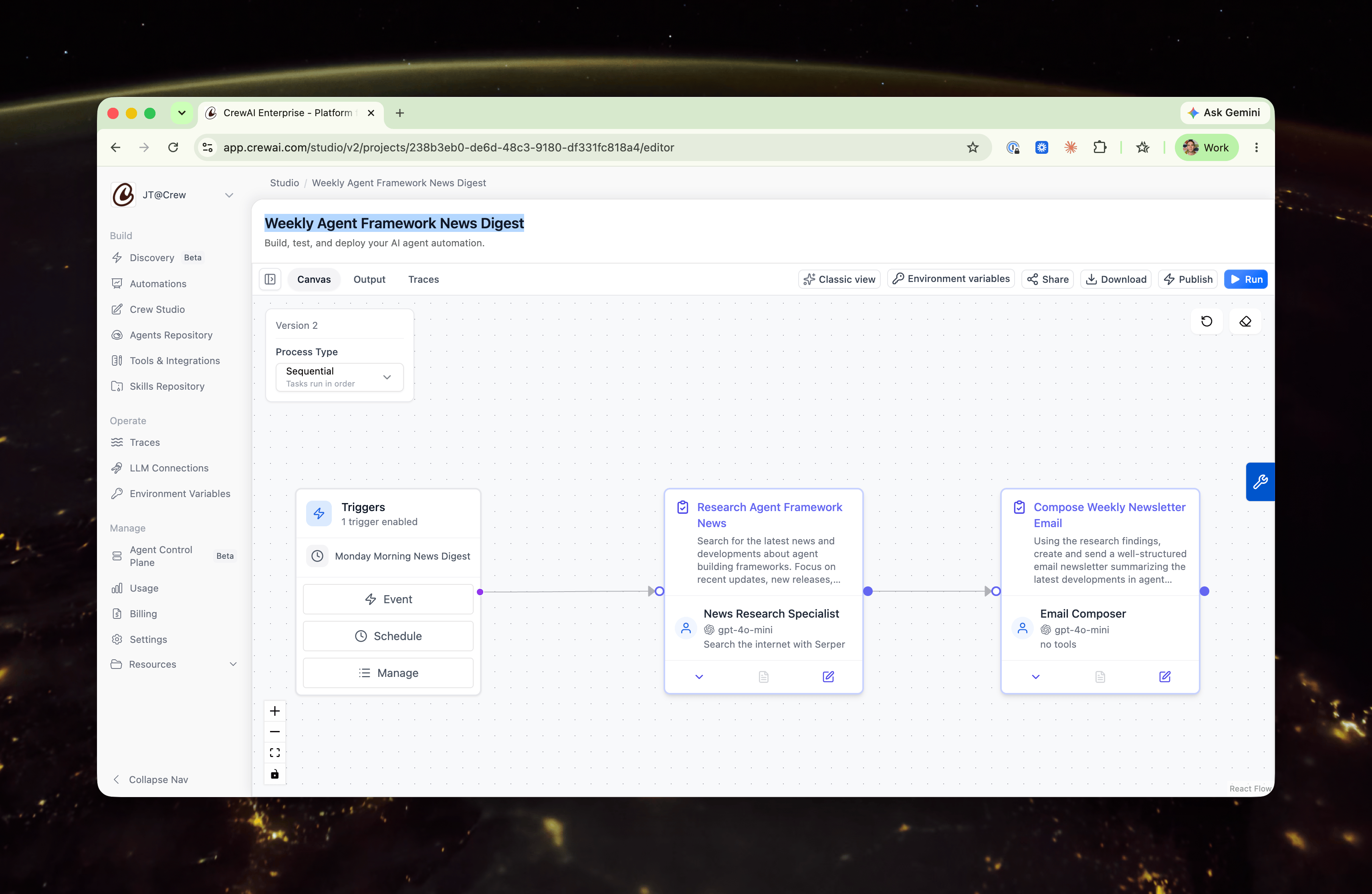
On the Studio canvas, each step of work is represented by a **single card**. The card combines two things that used to live in separate nodes:
* **The task** — what to do (name, description, expected output, and response format).
* **The agent** — who does it (the assigned agent, its model, and its tools).
An agent isn't an independent participant in your workflow — it's an attribute of the task: *which agent performs this work.* Putting the task and its agent on one card makes that relationship explicit and turns your automation into a single, left-to-right chain of work units that's easier to read at a glance.
 ## On the canvas
Each collapsed card shows:
* The **task name and description** at the top.
* A **footer summarizing the assigned agent** — avatar, name, model, and tools.
There's no separate agent node and no vertical agent → task edge. Your steps connect directly to one another in the order they run.
## In the editor
Open a card to edit it. The expanded view is the same card in a detailed state — not a different screen — organized into two clearly labeled sections.
## On the canvas
Each collapsed card shows:
* The **task name and description** at the top.
* A **footer summarizing the assigned agent** — avatar, name, model, and tools.
There's no separate agent node and no vertical agent → task edge. Your steps connect directly to one another in the order they run.
## In the editor
Open a card to edit it. The expanded view is the same card in a detailed state — not a different screen — organized into two clearly labeled sections.
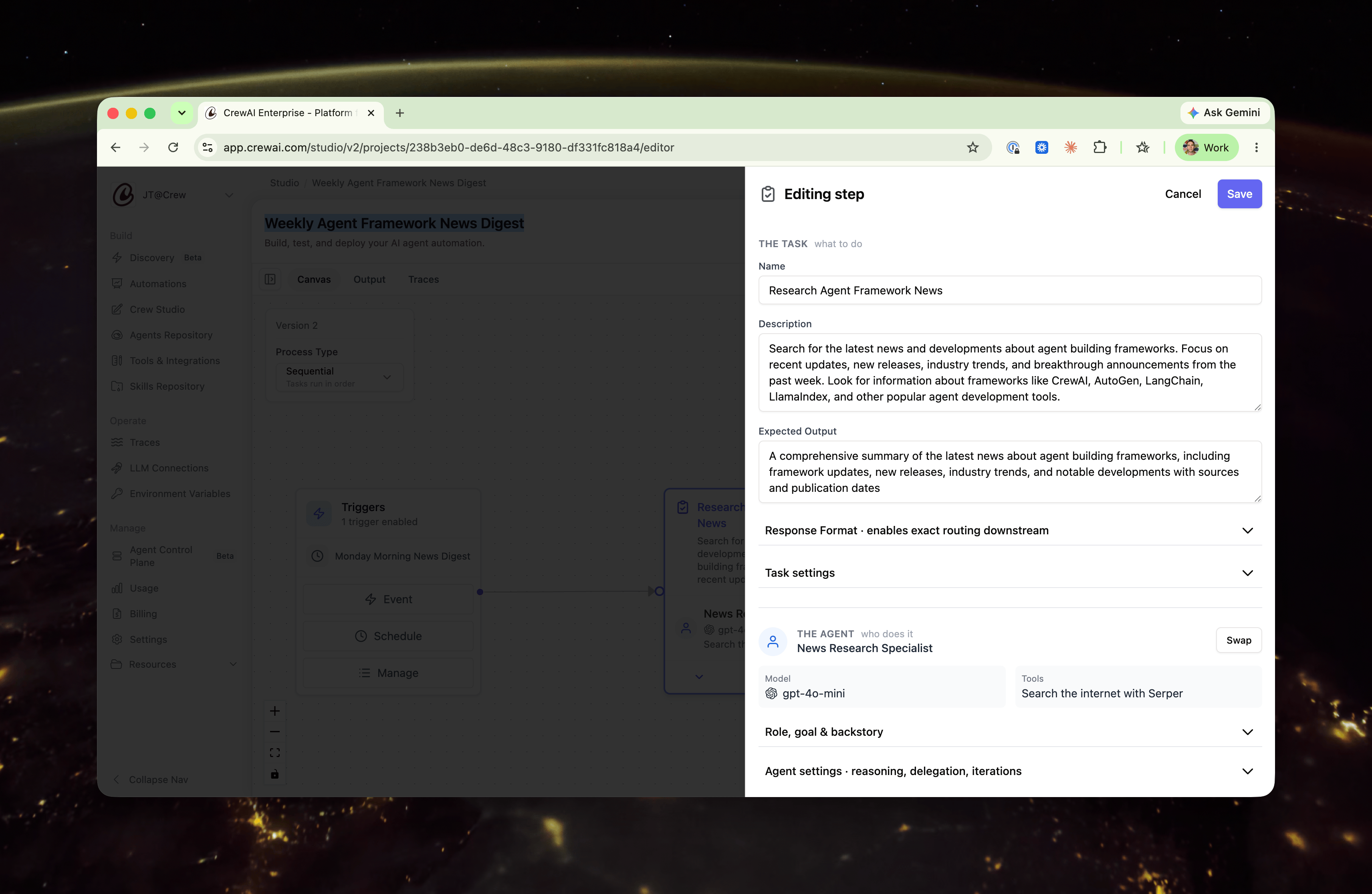 ### The task — what to do
Open by default, since this is what you usually edit:
* **Name**
* **Description**
* **Expected Output**
* **Response Format** — surfaced here because it controls exactly what downstream steps (such as routing) read from this step.
### The agent — who does it
The assigned agent is shown as a summary — **name, model, and tools inline**. Its deeper configuration is preserved behind two disclosures:
* **Role, goal & backstory**
* **Agent settings** — reasoning, max reasoning attempts, allow delegation, max iterations, and LLM settings.
An agent's full configuration — Role, Goal, Backstory, Model, Tools, LLM Settings, and the complete Agent Settings block — lives behind the **Role, goal & backstory** and **Agent settings** disclosures, organized by how often you edit it.
## Swapping vs. editing the agent
There are two distinct ways to work with the agent on a card, and they do different things:
* **Swap** reassigns *which* agent performs this task. Use the **Swap** control to pick a different agent from this project, choose one from your Agent Repository, or create a new agent. This is scoped to the task.
* **Editing** the agent — opening **Role, goal & backstory** or **Agent settings** — changes the agent *itself*.
### The task — what to do
Open by default, since this is what you usually edit:
* **Name**
* **Description**
* **Expected Output**
* **Response Format** — surfaced here because it controls exactly what downstream steps (such as routing) read from this step.
### The agent — who does it
The assigned agent is shown as a summary — **name, model, and tools inline**. Its deeper configuration is preserved behind two disclosures:
* **Role, goal & backstory**
* **Agent settings** — reasoning, max reasoning attempts, allow delegation, max iterations, and LLM settings.
An agent's full configuration — Role, Goal, Backstory, Model, Tools, LLM Settings, and the complete Agent Settings block — lives behind the **Role, goal & backstory** and **Agent settings** disclosures, organized by how often you edit it.
## Swapping vs. editing the agent
There are two distinct ways to work with the agent on a card, and they do different things:
* **Swap** reassigns *which* agent performs this task. Use the **Swap** control to pick a different agent from this project, choose one from your Agent Repository, or create a new agent. This is scoped to the task.
* **Editing** the agent — opening **Role, goal & backstory** or **Agent settings** — changes the agent *itself*.
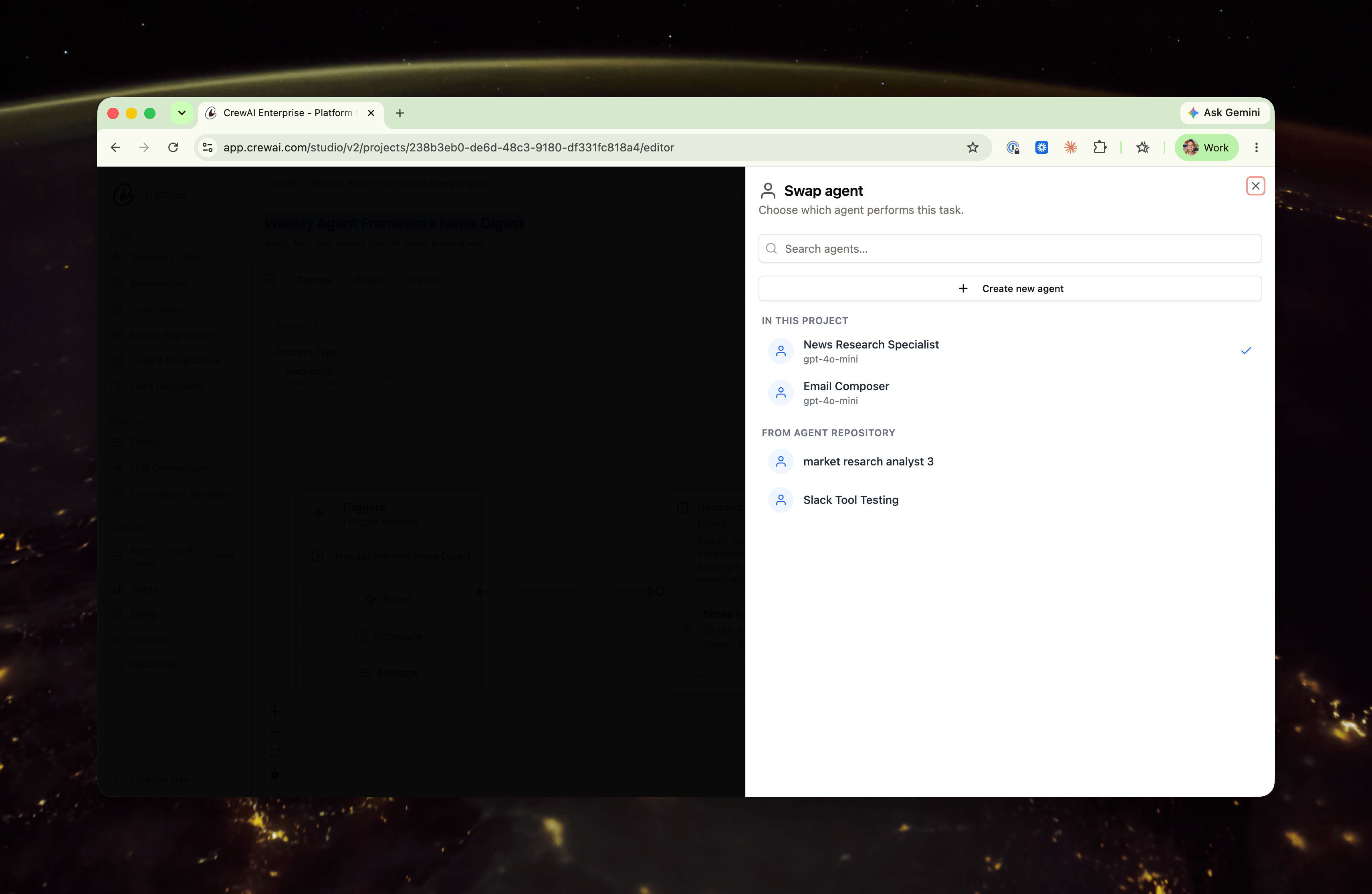 **Agents are reusable and shared.** The same agent can perform more than one task across your project. Editing an agent's role, backstory, or settings updates that agent **everywhere it's used** — not just on the card you opened. If you want a change to apply to only one step, **Swap** in a different agent instead of editing the shared one.
## Related
Build automations with AI assistance and a visual editor.
Manage and reuse agents across your automations.
**Agents are reusable and shared.** The same agent can perform more than one task across your project. Editing an agent's role, backstory, or settings updates that agent **everywhere it's used** — not just on the card you opened. If you want a change to apply to only one step, **Swap** in a different agent instead of editing the shared one.
## Related
Build automations with AI assistance and a visual editor.
Manage and reuse agents across your automations.