> ## Documentation Index
> Fetch the complete documentation index at: https://docs.crewai.com/llms.txt
> Use this file to discover all available pages before exploring further.
# Weave 통합
> Weights & Biases(W&B) Weave를 사용하여 CrewAI 애플리케이션을 추적, 실험, 평가 및 개선하는 방법을 알아보세요.
# Weave 개요
[Weights & Biases (W\&B) Weave](https://weave-docs.wandb.ai/)는 LLM 기반 애플리케이션을 추적, 실험, 평가, 배포 및 개선하기 위한 프레임워크입니다.
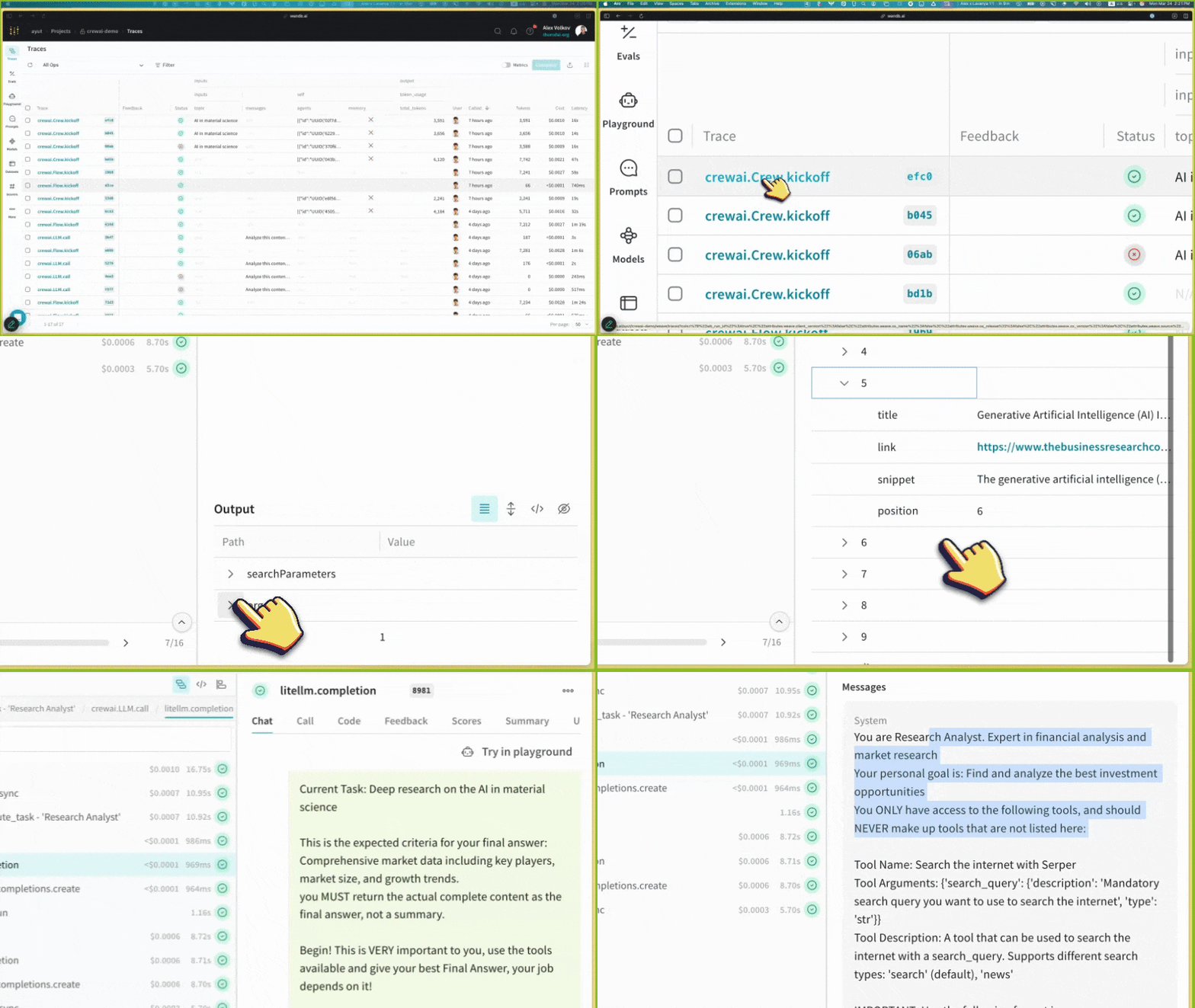 Weave는 CrewAI 애플리케이션 개발의 모든 단계에서 포괄적인 지원을 제공합니다:
* **트레이싱 및 모니터링**: LLM 호출과 애플리케이션 로직을 자동으로 추적하여 프로덕션 시스템을 디버그하고 분석
* **체계적인 반복**: prompt, 데이터셋, 모델을 개선하고 반복
* **평가**: 맞춤형 또는 사전 구축된 스코어러를 사용하여 agent 성능을 체계적으로 평가하고 향상
* **가드레일**: 콘텐츠 모더레이션과 prompt 안전성을 위한 사전 및 사후 보호조치로 agent를 보호
Weave는 CrewAI 애플리케이션의 트레이스를 자동으로 캡처하여 agent의 성능, 상호 작용 및 실행 흐름을 모니터링하고 분석할 수 있게 해줍니다. 이를 통해 더 나은 평가 데이터셋을 구축하고 agent 워크플로우를 최적화할 수 있습니다.
## 설치 안내
```shell theme={null}
pip install crewai weave
```
[Weights & Biases 계정](https://wandb.ai)에 가입하세요. 아직 계정이 없다면 가입이 필요합니다. 트레이스와 메트릭을 확인하려면 계정이 필요합니다.
다음 코드를 애플리케이션에 추가하세요:
```python theme={null}
import weave
# 프로젝트 이름으로 Weave를 초기화
weave.init(project_name="crewai_demo")
```
초기화 후, Weave는 트레이스와 메트릭을 확인할 수 있는 URL을 제공합니다.
```python theme={null}
from crewai import Agent, Task, Crew, LLM, Process
# 결정론적 출력을 위해 temperature를 0으로 설정하여 LLM 생성
llm = LLM(model="gpt-4o", temperature=0)
# 에이전트 생성
researcher = Agent(
role='Research Analyst',
goal='Find and analyze the best investment opportunities',
backstory='Expert in financial analysis and market research',
llm=llm,
verbose=True,
allow_delegation=False,
)
writer = Agent(
role='Report Writer',
goal='Write clear and concise investment reports',
backstory='Experienced in creating detailed financial reports',
llm=llm,
verbose=True,
allow_delegation=False,
)
# 작업 생성
research_task = Task(
description='Deep research on the {topic}',
expected_output='Comprehensive market data including key players, market size, and growth trends.',
agent=researcher
)
writing_task = Task(
description='Write a detailed report based on the research',
expected_output='The report should be easy to read and understand. Use bullet points where applicable.',
agent=writer
)
# 크루 생성
crew = Crew(
agents=[researcher, writer],
tasks=[research_task, writing_task],
verbose=True,
process=Process.sequential,
)
# 크루 실행
result = crew.kickoff(inputs={"topic": "AI in material science"})
print(result)
```
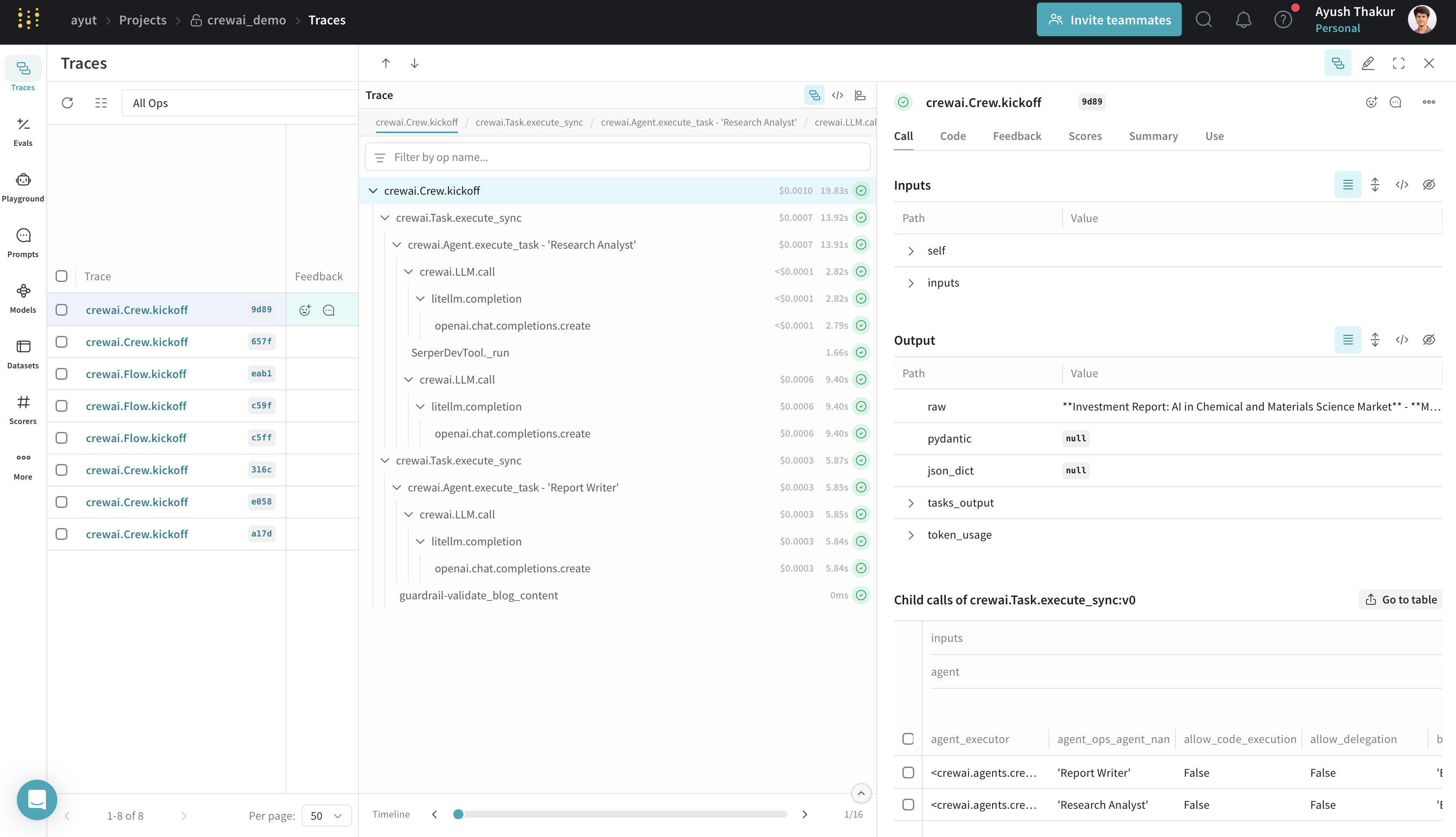
CrewAI 애플리케이션 실행 후, 초기화 시 제공된 Weave URL에 방문하여 다음 항목을 확인할 수 있습니다:
* LLM 호출 및 그 메타데이터
* 에이전트 상호작용 및 작업 실행 흐름
* 대기 시간 및 토큰 사용량과 같은 성능 메트릭
* 실행 중 발생한 오류 또는 이슈
Weave는 CrewAI 애플리케이션 개발의 모든 단계에서 포괄적인 지원을 제공합니다:
* **트레이싱 및 모니터링**: LLM 호출과 애플리케이션 로직을 자동으로 추적하여 프로덕션 시스템을 디버그하고 분석
* **체계적인 반복**: prompt, 데이터셋, 모델을 개선하고 반복
* **평가**: 맞춤형 또는 사전 구축된 스코어러를 사용하여 agent 성능을 체계적으로 평가하고 향상
* **가드레일**: 콘텐츠 모더레이션과 prompt 안전성을 위한 사전 및 사후 보호조치로 agent를 보호
Weave는 CrewAI 애플리케이션의 트레이스를 자동으로 캡처하여 agent의 성능, 상호 작용 및 실행 흐름을 모니터링하고 분석할 수 있게 해줍니다. 이를 통해 더 나은 평가 데이터셋을 구축하고 agent 워크플로우를 최적화할 수 있습니다.
## 설치 안내
```shell theme={null}
pip install crewai weave
```
[Weights & Biases 계정](https://wandb.ai)에 가입하세요. 아직 계정이 없다면 가입이 필요합니다. 트레이스와 메트릭을 확인하려면 계정이 필요합니다.
다음 코드를 애플리케이션에 추가하세요:
```python theme={null}
import weave
# 프로젝트 이름으로 Weave를 초기화
weave.init(project_name="crewai_demo")
```
초기화 후, Weave는 트레이스와 메트릭을 확인할 수 있는 URL을 제공합니다.
```python theme={null}
from crewai import Agent, Task, Crew, LLM, Process
# 결정론적 출력을 위해 temperature를 0으로 설정하여 LLM 생성
llm = LLM(model="gpt-4o", temperature=0)
# 에이전트 생성
researcher = Agent(
role='Research Analyst',
goal='Find and analyze the best investment opportunities',
backstory='Expert in financial analysis and market research',
llm=llm,
verbose=True,
allow_delegation=False,
)
writer = Agent(
role='Report Writer',
goal='Write clear and concise investment reports',
backstory='Experienced in creating detailed financial reports',
llm=llm,
verbose=True,
allow_delegation=False,
)
# 작업 생성
research_task = Task(
description='Deep research on the {topic}',
expected_output='Comprehensive market data including key players, market size, and growth trends.',
agent=researcher
)
writing_task = Task(
description='Write a detailed report based on the research',
expected_output='The report should be easy to read and understand. Use bullet points where applicable.',
agent=writer
)
# 크루 생성
crew = Crew(
agents=[researcher, writer],
tasks=[research_task, writing_task],
verbose=True,
process=Process.sequential,
)
# 크루 실행
result = crew.kickoff(inputs={"topic": "AI in material science"})
print(result)
```
CrewAI 애플리케이션 실행 후, 초기화 시 제공된 Weave URL에 방문하여 다음 항목을 확인할 수 있습니다:
* LLM 호출 및 그 메타데이터
* 에이전트 상호작용 및 작업 실행 흐름
* 대기 시간 및 토큰 사용량과 같은 성능 메트릭
* 실행 중 발생한 오류 또는 이슈
 ## 특징
* Weave는 모든 CrewAI 작업을 자동으로 캡처합니다: agent 상호작용 및 태스크 실행; 메타데이터와 토큰 사용량을 포함한 LLM 호출; 도구 사용 및 결과.
* 이 통합은 모든 CrewAI 실행 메서드를 지원합니다: `kickoff()`, `kickoff_for_each()`, `kickoff_async()`, 그리고 `kickoff_for_each_async()`.
* 모든 [crewAI-tools](https://github.com/crewAIInc/crewAI-tools) 작업의 자동 추적.
* 데코레이터 패칭(`@start`, `@listen`, `@router`, `@or_`, `@and_`)을 통한 flow 기능 지원.
* `@weave.op()`과 함께 CrewAI `Task`에 전달된 커스텀 guardrails 추적.
지원되는 항목에 대한 자세한 정보는 [Weave CrewAI 문서](https://weave-docs.wandb.ai/guides/integrations/crewai/#getting-started-with-flow)를 참조하세요.
## 자료
* [📘 Weave 문서](https://weave-docs.wandb.ai)
* [📊 예시 Weave x CrewAI 대시보드](https://wandb.ai/ayut/crewai_demo/weave/traces?cols=%7B%22wb_run_id%22%3Afalse%2C%22attributes.weave.client_version%22%3Afalse%2C%22attributes.weave.os_name%22%3Afalse%2C%22attributes.weave.os_release%22%3Afalse%2C%22attributes.weave.os_version%22%3Afalse%2C%22attributes.weave.source%22%3Afalse%2C%22attributes.weave.sys_version%22%3Afalse%7D\&peekPath=%2Fayut%2Fcrewai_demo%2Fcalls%2F0195c838-38cb-71a2-8a15-651ecddf9d89)
* [🐦 X](https://x.com/weave_wb)
## 특징
* Weave는 모든 CrewAI 작업을 자동으로 캡처합니다: agent 상호작용 및 태스크 실행; 메타데이터와 토큰 사용량을 포함한 LLM 호출; 도구 사용 및 결과.
* 이 통합은 모든 CrewAI 실행 메서드를 지원합니다: `kickoff()`, `kickoff_for_each()`, `kickoff_async()`, 그리고 `kickoff_for_each_async()`.
* 모든 [crewAI-tools](https://github.com/crewAIInc/crewAI-tools) 작업의 자동 추적.
* 데코레이터 패칭(`@start`, `@listen`, `@router`, `@or_`, `@and_`)을 통한 flow 기능 지원.
* `@weave.op()`과 함께 CrewAI `Task`에 전달된 커스텀 guardrails 추적.
지원되는 항목에 대한 자세한 정보는 [Weave CrewAI 문서](https://weave-docs.wandb.ai/guides/integrations/crewai/#getting-started-with-flow)를 참조하세요.
## 자료
* [📘 Weave 문서](https://weave-docs.wandb.ai)
* [📊 예시 Weave x CrewAI 대시보드](https://wandb.ai/ayut/crewai_demo/weave/traces?cols=%7B%22wb_run_id%22%3Afalse%2C%22attributes.weave.client_version%22%3Afalse%2C%22attributes.weave.os_name%22%3Afalse%2C%22attributes.weave.os_release%22%3Afalse%2C%22attributes.weave.os_version%22%3Afalse%2C%22attributes.weave.source%22%3Afalse%2C%22attributes.weave.sys_version%22%3Afalse%7D\&peekPath=%2Fayut%2Fcrewai_demo%2Fcalls%2F0195c838-38cb-71a2-8a15-651ecddf9d89)
* [🐦 X](https://x.com/weave_wb)