
Taking Control of AI Workflows with Flows
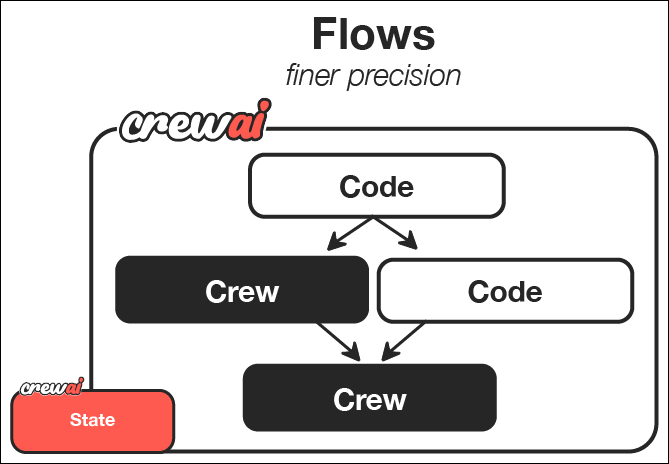
CrewAI Flows represent the next level in AI orchestration - combining the collaborative power of AI agent crews with the precision and flexibility of procedural programming. While crews excel at agent collaboration, flows give you fine-grained control over exactly how and when different components of your AI system interact. In this guide, we’ll walk through creating a powerful CrewAI Flow that generates a comprehensive learning guide on any topic. This tutorial will demonstrate how Flows provide structured, event-driven control over your AI workflows by combining regular code, direct LLM calls, and crew-based processing.What Makes Flows Powerful
Flows enable you to:- Combine different AI interaction patterns - Use crews for complex collaborative tasks, direct LLM calls for simpler operations, and regular code for procedural logic
- Build event-driven systems - Define how components respond to specific events and data changes
- Maintain state across components - Share and transform data between different parts of your application
- Integrate with external systems - Seamlessly connect your AI workflow with databases, APIs, and user interfaces
- Create complex execution paths - Design conditional branches, parallel processing, and dynamic workflows
What You’ll Build and Learn
By the end of this guide, you’ll have:- Created a sophisticated content generation system that combines user input, AI planning, and multi-agent content creation
- Orchestrated the flow of information between different components of your system
- Implemented event-driven architecture where each step responds to the completion of previous steps
- Built a foundation for more complex AI applications that you can expand and customize
- Interactive AI assistants that combine multiple specialized subsystems
- Complex data processing pipelines with AI-enhanced transformations
- Autonomous agents that integrate with external services and APIs
- Multi-stage decision-making systems with human-in-the-loop processes
Prerequisites
Before starting, make sure you have:- Installed CrewAI following the installation guide
- Set up your LLM API key in your environment, following the LLM setup guide
- Basic understanding of Python
Step 1: Create a New CrewAI Flow Project
First, let’s create a new CrewAI Flow project using the CLI. This command sets up a scaffolded project with all the necessary directories and template files for your flow.crewai create asks Run it now?, answer n. This guide edits the flow before running it.
This will generate a project with the basic structure needed for your flow.
CrewAI Framework Overview
Step 2: Understanding the Project Structure
The generated project has the following structure. The starter embedded crew uses the classic Python/YAML layout, and in Step 4 we will replace the content crew with a JSONC crew.- The main flow logic in the
src/guide_creator_flow/main.pyfile - Specialized crews in the
src/guide_creator_flow/crewsdirectory - Custom tools in the
src/guide_creator_flow/toolsdirectory
Step 3: Add a Content Writer Crew
Our flow will need a specialized crew to handle the content creation process. Let’s use the CrewAI CLI to add a content writer crew:Step 4: Configure the Content Writer Crew
Now, let’s configure the content writer crew with JSONC. We’ll set up two specialized agents - a writer and a reviewer - that collaborate to create high-quality content for our guide.- Create
src/guide_creator_flow/crews/content_crew/agents/content_writer.jsonc:
- Create
src/guide_creator_flow/crews/content_crew/agents/content_reviewer.jsonc:
provider/model-id with the model you use, for example openai/gpt-4o, gemini/gemini-3.7-flash, or anthropic/claude-sonnet-4-6.
- Create
src/guide_creator_flow/crews/content_crew/crew.jsonc:
context field lets the reviewer use the writer’s output.
- Replace
src/guide_creator_flow/crews/content_crew/content_crew.pywith a small loader:
crew.jsonc into a Crew at runtime. While this crew can function independently, in our flow it will be orchestrated as part of a larger system.
Step 5: Create the Flow
Now comes the exciting part - creating the flow that will orchestrate the entire guide creation process. This is where we’ll combine regular Python code, direct LLM calls, and our content creation crew into a cohesive system. Our flow will:- Get user input for a topic and audience level
- Make a direct LLM call to create a structured guide outline
- Process each section sequentially using the content writer crew
- Combine everything into a final comprehensive document
main.py file:
- We define Pydantic models for structured data, ensuring type safety and clear data representation
- We create a state class to maintain data across different steps of the flow
- We implement three main flow steps:
- Getting user input with the
@start()decorator - Creating a guide outline with a direct LLM call
- Processing sections with our content crew
- Getting user input with the
- We use the
@listen()decorator to establish event-driven relationships between steps
Step 6: Set Up Your Environment Variables
When you rancrewai create flow in a terminal, it asked for a provider, a model,
and its API key, and saved them to the .env file in your project root. If you
skipped the key, add it to .env now. This guide’s outline step calls
openai/gpt-4o-mini, so .env also needs OPENAI_API_KEY whichever model you
picked. See the LLM setup guide for
details on configuring a provider.
.env
Step 7: Install Dependencies
Install the required dependencies:Step 8: Run Your Flow
Now it’s time to see your flow in action! Run it using the CrewAI CLI:- It will prompt you for a topic and audience level
- It will create a structured outline for your guide
- It will process each section, with the content writer and reviewer collaborating on each
- Finally, it will compile everything into a comprehensive guide
Step 9: Visualize Your Flow
One of the powerful features of flows is the ability to visualize their structure:Step 10: Review the Output
Once the flow completes, you’ll find two files in theoutput directory:
guide_outline.json: Contains the structured outline of the guidecomplete_guide.md: The comprehensive guide with all sections
The Art of the Possible: Beyond Your First Flow
What you’ve learned in this guide provides a foundation for creating much more sophisticated AI systems. Here are some ways you could extend this basic flow:Enhancing User Interaction
You could create more interactive flows with:- Web interfaces for input and output
- Real-time progress updates
- Interactive feedback and refinement loops
- Multi-stage user interactions
Adding More Processing Steps
You could expand your flow with additional steps for:- Research before outline creation
- Image generation for illustrations
- Code snippet generation for technical guides
- Final quality assurance and fact-checking
Creating More Complex Flows
You could implement more sophisticated flow patterns:- Conditional branching based on user preferences or content type
- Parallel processing of independent sections
- Iterative refinement loops with feedback
- Integration with external APIs and services
Applying to Different Domains
The same patterns can be applied to create flows for:- Interactive storytelling: Create personalized stories based on user input
- Business intelligence: Process data, generate insights, and create reports
- Product development: Facilitate ideation, design, and planning
- Educational systems: Create personalized learning experiences
Key Features Demonstrated
This guide creator flow demonstrates several powerful features of CrewAI:- User interaction: The flow collects input directly from the user
- Direct LLM calls: Uses the LLM class for efficient, single-purpose AI interactions
- Structured data with Pydantic: Uses Pydantic models to ensure type safety
- Sequential processing with context: Writes sections in order, providing previous sections for context
- Multi-agent crews: Leverages specialized agents (writer and reviewer) for content creation
- State management: Maintains state across different steps of the process
- Event-driven architecture: Uses the
@listendecorator to respond to events
Understanding the Flow Structure
Let’s break down the key components of flows to help you understand how to build your own:1. Direct LLM Calls
Flows allow you to make direct calls to language models when you need simple, structured responses:2. Event-Driven Architecture
Flows use decorators to establish relationships between components:3. State Management
Flows maintain state across steps, making it easy to share data:4. Crew Integration
Flows can seamlessly integrate with crews for complex collaborative tasks:Next Steps
Now that you’ve built your first flow, you can:- Experiment with more complex flow structures and patterns
- Try using
@router()to create conditional branches in your flows - Explore the
and_andor_functions for more complex parallel execution - Connect your flow to external APIs, databases, or user interfaces
- Combine multiple specialized crews in a single flow
- Build multi-turn chat apps with Conversational Flows (
kickoffper message,ChatSession, deferred tracing)
Congratulations! You’ve successfully built your first CrewAI Flow that combines regular code, direct LLM calls, and crew-based processing to create a comprehensive guide. These foundational skills enable you to create increasingly sophisticated AI applications that can tackle complex, multi-stage problems through a combination of procedural control and collaborative intelligence.