
Human-in-the-Loop (HITL) is a powerful approach that combines artificial intelligence with human expertise to enhance decision-making and improve task outcomes. CrewAI provides multiple ways to implement HITL depending on your needs.

Choosing Your HITL Approach

CrewAI offers two main approaches for implementing human-in-the-loop workflows:
ApproachBest ForIntegration
Flow-based (@human_feedback decorator)Local development, console-based review, synchronous workflowsHuman Feedback in Flows
Webhook-based (Enterprise)Production deployments, async workflows, external integrations (Slack, Teams, etc.)This guide
If you’re building flows and want to add human review steps with routing based on feedback, check out the Human Feedback in Flows guide for the @human_feedback decorator.

Setting Up Webhook-Based HITL Workflows

1

Configure Your Task

Set up your task with human input enabled:
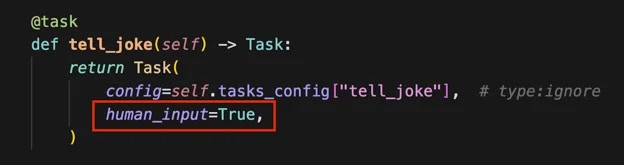
Crew Human Input
2

Provide Webhook URL

When kicking off your crew, include a webhook URL for human input:
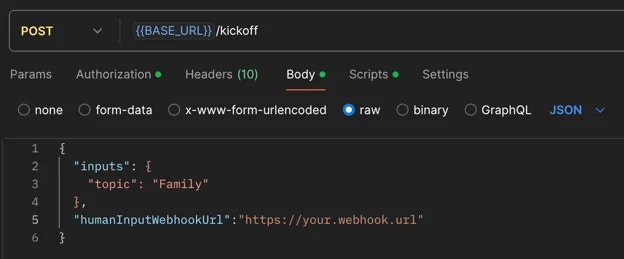
Crew Webhook URL
Example with Bearer authentication:
curl -X POST {BASE_URL}/kickoff \
  -H "Authorization: Bearer YOUR_API_TOKEN" \
  -H "Content-Type: application/json" \
  -d '{
    "inputs": {
      "topic": "AI Research"
    },
    "humanInputWebhook": {
      "url": "https://your-webhook.com/hitl",
      "authentication": {
        "strategy": "bearer",
        "token": "your-webhook-secret-token"
      }
    }
  }'
Or with Basic authentication:
curl -X POST {BASE_URL}/kickoff \
  -H "Authorization: Bearer YOUR_API_TOKEN" \
  -H "Content-Type: application/json" \
  -d '{
    "inputs": {
      "topic": "AI Research"
    },
    "humanInputWebhook": {
      "url": "https://your-webhook.com/hitl",
      "authentication": {
        "strategy": "basic",
        "username": "your-username",
        "password": "your-password"
      }
    }
  }'
3

Receive Webhook Notification

Once the crew completes the task requiring human input, you’ll receive a webhook notification containing:
  • Execution ID
  • Task ID
  • Task output
4

Review Task Output

The system will pause in the Pending Human Input state. Review the task output carefully.
5

Submit Human Feedback

Call the resume endpoint of your crew with the following information:
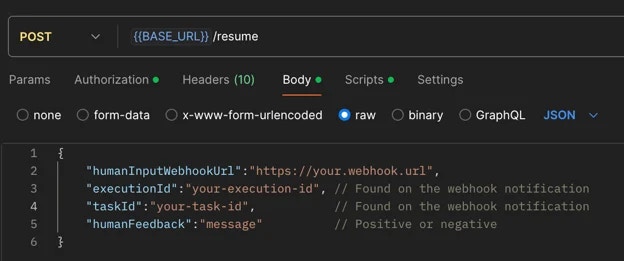
Crew Resume Endpoint
Critical: Webhook URLs Must Be Provided Again: You must provide the same webhook URLs (taskWebhookUrl, stepWebhookUrl, crewWebhookUrl) in the resume call that you used in the kickoff call. Webhook configurations are NOT automatically carried over from kickoff - they must be explicitly included in the resume request to continue receiving notifications for task completion, agent steps, and crew completion.
Example resume call with webhooks:
curl -X POST {BASE_URL}/resume \
  -H "Authorization: Bearer YOUR_API_TOKEN" \
  -H "Content-Type: application/json" \
  -d '{
    "execution_id": "abcd1234-5678-90ef-ghij-klmnopqrstuv",
    "task_id": "research_task",
    "human_feedback": "Great work! Please add more details.",
    "is_approve": true,
    "taskWebhookUrl": "https://your-server.com/webhooks/task",
    "stepWebhookUrl": "https://your-server.com/webhooks/step",
    "crewWebhookUrl": "https://your-server.com/webhooks/crew"
  }'
Feedback Impact on Task Execution: It’s crucial to exercise care when providing feedback, as the entire feedback content will be incorporated as additional context for further task executions.
This means:
  • All information in your feedback becomes part of the task’s context.
  • Irrelevant details may negatively influence it.
  • Concise, relevant feedback helps maintain task focus and efficiency.
  • Always review your feedback carefully before submission to ensure it contains only pertinent information that will positively guide the task’s execution.
6

Handle Negative Feedback

If you provide negative feedback:
  • The crew will retry the task with added context from your feedback.
  • You’ll receive another webhook notification for further review.
  • Repeat steps 4-6 until satisfied.
7

Execution Continuation

When you submit positive feedback, the execution will proceed to the next steps.

Best Practices

  • Be Specific: Provide clear, actionable feedback that directly addresses the task at hand
  • Stay Relevant: Only include information that will help improve the task execution
  • Be Timely: Respond to HITL prompts promptly to avoid workflow delays
  • Review Carefully: Double-check your feedback before submitting to ensure accuracy

Common Use Cases

HITL workflows are particularly valuable for:
  • Quality assurance and validation
  • Complex decision-making scenarios
  • Sensitive or high-stakes operations
  • Creative tasks requiring human judgment
  • Compliance and regulatory reviews