
HITL Approaches in CrewAI
CrewAI offers two approaches for implementing human-in-the-loop workflows:Flow-Based HITL with Enterprise Platform
The
@human_feedback decorator requires CrewAI version 1.8.0 or higher.@human_feedback decorator in your Flows, CrewAI Enterprise provides an email-first HITL system that enables anyone with an email address to respond to review requests:
Email-First Design
Responders receive email notifications and can reply directly—no login required.
Dashboard Review
Review and respond to HITL requests in the Enterprise dashboard when preferred.
Flexible Routing
Route requests to specific emails based on method patterns or pull from flow state.
Auto-Response
Configure automatic fallback responses when no human replies within the timeout.
Key Benefits
- External responders: Anyone with an email can respond, even non-platform users
- Dynamic assignment: Pull assignee email from flow state (e.g.,
account_owner_email) - Simple configuration: Email-based routing is easier to set up than user/role management
- Deployment creator fallback: If no routing rule matches, the deployment creator is notified
Setting Up Webhook-Based HITL Workflows
For custom integrations with external systems like Slack, Microsoft Teams, or your own applications, you can use the webhook-based approach:1
Configure Your Task
Set up your task with human input enabled: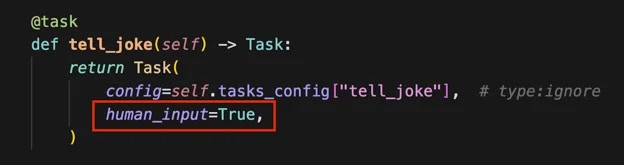
2
Provide Webhook URL
When kicking off your crew, include a webhook URL for human input: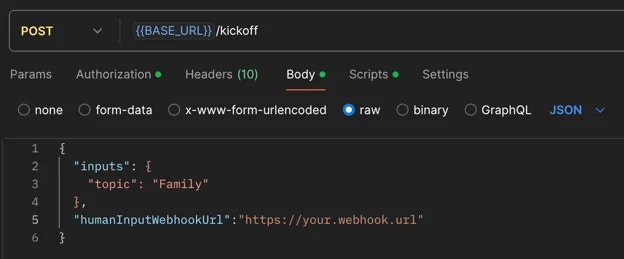
3
Receive Webhook Notification
Once the crew completes the task requiring human input, you’ll receive a webhook notification containing:
- Execution ID
- Task ID
- Task output
4
Review Task Output
The system will pause in the
Pending Human Input state. Review the task output carefully.5
Submit Human Feedback
Call the resume endpoint of your crew with the following information: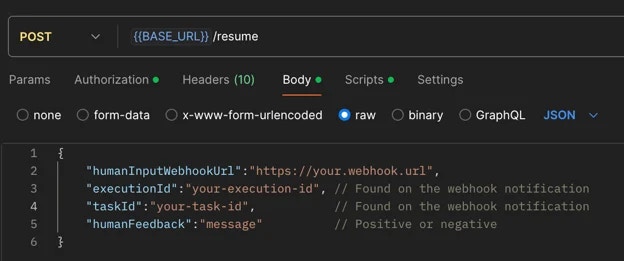
- All information in your feedback becomes part of the task’s context.
- Irrelevant details may negatively influence it.
- Concise, relevant feedback helps maintain task focus and efficiency.
- Always review your feedback carefully before submission to ensure it contains only pertinent information that will positively guide the task’s execution.
6
Handle Negative Feedback
If you provide negative feedback:
- The crew will retry the task with added context from your feedback.
- You’ll receive another webhook notification for further review.
- Repeat steps 4-6 until satisfied.
7
Execution Continuation
When you submit positive feedback, the execution will proceed to the next steps.
Best Practices
- Be Specific: Provide clear, actionable feedback that directly addresses the task at hand
- Stay Relevant: Only include information that will help improve the task execution
- Be Timely: Respond to HITL prompts promptly to avoid workflow delays
- Review Carefully: Double-check your feedback before submitting to ensure accuracy
Common Use Cases
HITL workflows are particularly valuable for:- Quality assurance and validation
- Complex decision-making scenarios
- Sensitive or high-stakes operations
- Creative tasks requiring human judgment
- Compliance and regulatory reviews
Learn More
Flow HITL Management
Explore the full Enterprise Flow HITL platform capabilities including email notifications, routing rules, auto-response, and analytics.
Human Feedback in Flows
Implementation guide for the
@human_feedback decorator in your Flows.