체크포인팅은 실행 중 실행 상태의 스냅샷을 저장하여 크루, 플로우, 에이전트가 실패 후 재개하거나 대체 브랜치로 분기될 수 있도록 합니다.
설명 체크포인팅의 작동 방식: 이벤트, 스토리지, 상속.
사용 방법 일반적인 워크플로우를 위한 작업 중심 레시피.
레퍼런스 CheckpointConfig, 이벤트, 프로바이더, CLI.
체크포인트란 체크포인트는 실행 중인 작업을 재현하기 위해 CrewAI가 필요한 모든 것을 캡처합니다: 크루, 플로우 또는 에이전트의 전체 상태 — 구성, 에이전트의 메모리 및 지식 소스, 태스크 진행 상황, 중간 출력값, 내부 상태 및 속성 — 그리고 kickoff 입력, 해당 시점까지의 이벤트 기록, 그리고 체크포인트를 원본 실행에 연결하는 lineage ID를 포함합니다.
복원하면 해당 상태를 재구성하고 계속 진행합니다. 완료된 태스크는 건너뛰고, 메모리와 지식은 재수화되며, 다운스트림 작업은 원본 실행이 생성한 동일한 출력을 기반으로 실행됩니다. 포크하면 새 lineage 아래에서 동일한 복원을 수행하여 새 브랜치와 원본 실행이 서로 덮어쓰지 않고 나란히 체크포인트를 기록할 수 있습니다.
체크포인트가 기록되는 시점 체크포인팅은 이벤트 기반입니다. 런타임은 on_events로 선택한 이벤트를 구독하고, 이벤트가 발생할 때마다 체크포인트를 기록합니다. 기본값 task_completed는 완료된 태스크당 하나의 체크포인트를 생성합니다 — 세분화와 디스크 사용의 합리적인 균형입니다. llm_call_completed와 같은 고빈도 이벤트는 더 세밀한 복구를 위해 사용 가능하지만 훨씬 많은 파일을 기록합니다.
스토리지 CrewAI에는 두 가지 프로바이더가 포함되어 있습니다:
JsonProvider는 체크포인트당 하나의 파일을 기록합니다. 사람이 읽기 쉽고 검사하기 편리합니다.SqliteProvider는 단일 SQLite 데이터베이스에 기록합니다. 고빈도 체크포인팅에 적합합니다.
max_checkpoints가 설정되면 두 프로바이더 모두 가장 오래된 체크포인트를 자동으로 제거합니다.체크포인트 기록은 best-effort 방식입니다. 실패한 체크포인트는 로그에 기록되지만 실행을 중단시키지 않습니다.
상속 모델 Crew, Flow, Agent 모두 checkpoint 인수를 받습니다. 자식은 자체 값을 설정하거나 False를 전달하여 옵트아웃하지 않는 한 부모로부터 상속합니다. 크루에서 체크포인팅을 한 번 활성화하면 모든 에이전트가 참여하거나, 특정 에이전트만 선택적으로 제외할 수 있습니다.튜토리얼: 실패한 크루 재개하기 이 가이드는 약 5분이 소요됩니다. 두 개의 태스크가 있는 크루를 실행하고 중간에 종료한 다음, 저장된 체크포인트에서 재개합니다.
체크포인팅이 활성화된 크루를 생성합니다
from crewai import Agent, Crew, Task researcher = Agent( role = "Researcher" , goal = "Research" , backstory = "Expert" ) writer = Agent( role = "Writer" , goal = "Write" , backstory = "Expert" ) crew = Crew( agents = [researcher, writer], tasks = [ Task( description = "Research AI trends" , agent = researcher, expected_output = "bullets" ), Task( description = "Write a summary" , agent = writer, expected_output = "paragraph" ), ], checkpoint = True , )
실행하고 첫 번째 태스크 후에 중단합니다
첫 번째 태스크가 완료된 후 Ctrl+C를 누릅니다. ./.checkpoints/ 디렉토리에서 <timestamp>_<uuid>.json 형식의 파일이 체크포인트입니다.
체크포인트에서 재개합니다
from crewai import CheckpointConfig result = crew.kickoff( from_checkpoint = CheckpointConfig( restore_from = "./.checkpoints/<timestamp>_<uuid>.json" , ), )
연구 태스크는 건너뛰고, 작성자는 저장된 연구 출력에 대해 실행되며, 크루가 완료됩니다. 사용 방법
crew = Crew( agents = [ ... ], tasks = [ ... ], checkpoint = True )
task_completed 이벤트마다 ./.checkpoints/에 기록합니다.
from crewai import Crew, CheckpointConfig crew = Crew( agents = [ ... ], tasks = [ ... ], checkpoint = CheckpointConfig( location = "./my_checkpoints" , on_events = [ "task_completed" , "crew_kickoff_completed" ], max_checkpoints = 5 , ), )
JsonProvider
SqliteProvider
from crewai import Crew, CheckpointConfig from crewai.state import JsonProvider crew = Crew( agents = [ ... ], tasks = [ ... ], checkpoint = CheckpointConfig( location = "./my_checkpoints" , provider = JsonProvider(), max_checkpoints = 5 , ), )
SQLite는 동시 읽기를 위해 WAL 저널 모드를 활성화합니다. 고빈도 체크포인팅에는 SQLite를 선호하세요.
crew = Crew( agents = [ Agent( role = "Researcher" , ... ), Agent( role = "Writer" , ... , checkpoint = False ), ], tasks = [ ... ], checkpoint = True , )
crew = Crew( agents = [researcher, writer], tasks = [research_task, write_task, review_task], checkpoint = CheckpointConfig( location = "./crew_cp" ), )
기본 트리거: task_completed. from crewai.flow.flow import Flow, start, listen from crewai import CheckpointConfig class MyFlow ( Flow ): @start () def step_one ( self ): return "data" @listen (step_one) def step_two ( self , data ): return process(data) flow = MyFlow( checkpoint = CheckpointConfig( location = "./flow_cp" , on_events = [ "method_execution_finished" ], ), ) result = flow.kickoff()
agent = Agent( role = "Researcher" , goal = "Research topics" , backstory = "Expert researcher" , checkpoint = CheckpointConfig( location = "./agent_cp" , on_events = [ "lite_agent_execution_completed" ], ), ) result = agent.kickoff( messages = [{ "role" : "user" , "content" : "Research AI trends" }])
모든 이벤트에 핸들러를 등록하고 state.checkpoint()를 호출합니다. from __future__ import annotations from typing import TYPE_CHECKING , Any from crewai.events.event_bus import crewai_event_bus from crewai.events.types.llm_events import LLMCallCompletedEvent if TYPE_CHECKING : from crewai.state.runtime import RuntimeState @crewai_event_bus.on (LLMCallCompletedEvent) def on_llm_done ( source : Any, event : LLMCallCompletedEvent, state : RuntimeState) -> None : path = state.checkpoint( "./my_checkpoints" ) print ( f "체크포인트 저장: { path } " )
핸들러가 세 개의 매개변수를 받을 때 state 인수가 자동으로 제공됩니다. 전체 이벤트 카탈로그는 Event Listeners 문서를 참조하세요.
crewai checkpoint crewai checkpoint --location ./my_checkpoints crewai checkpoint --location ./.checkpoints.db
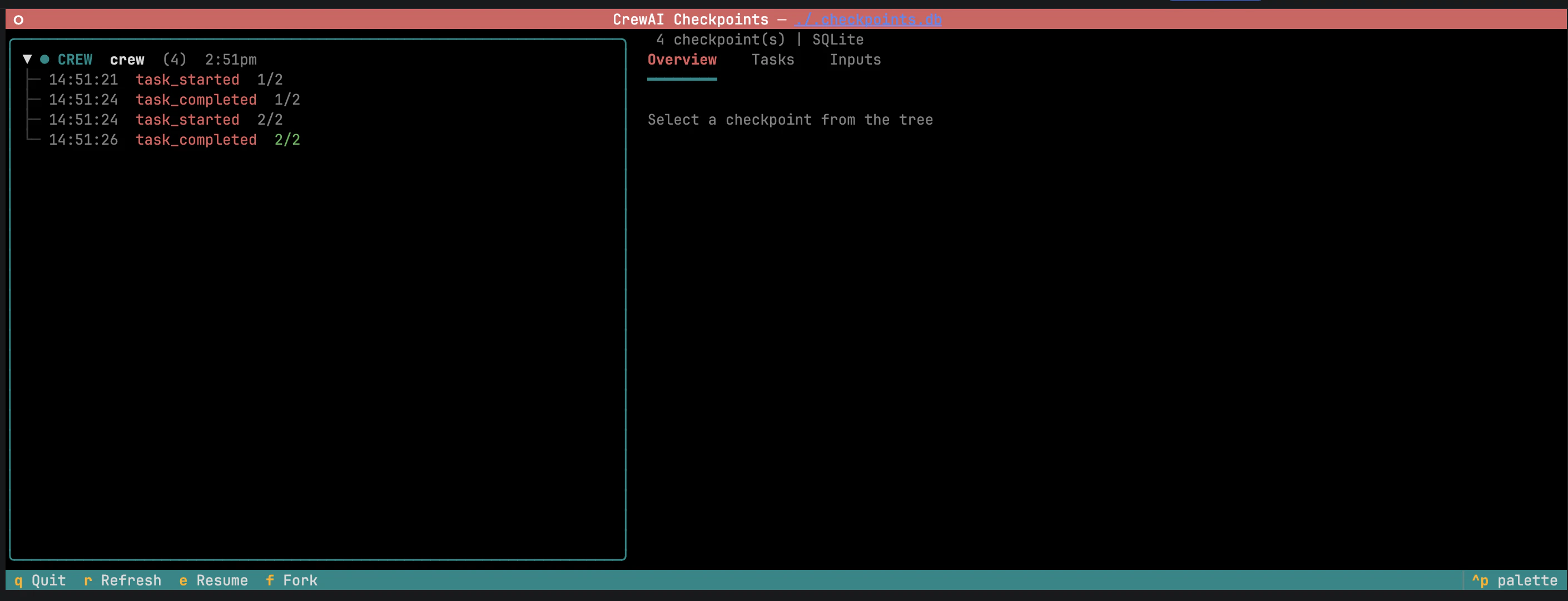
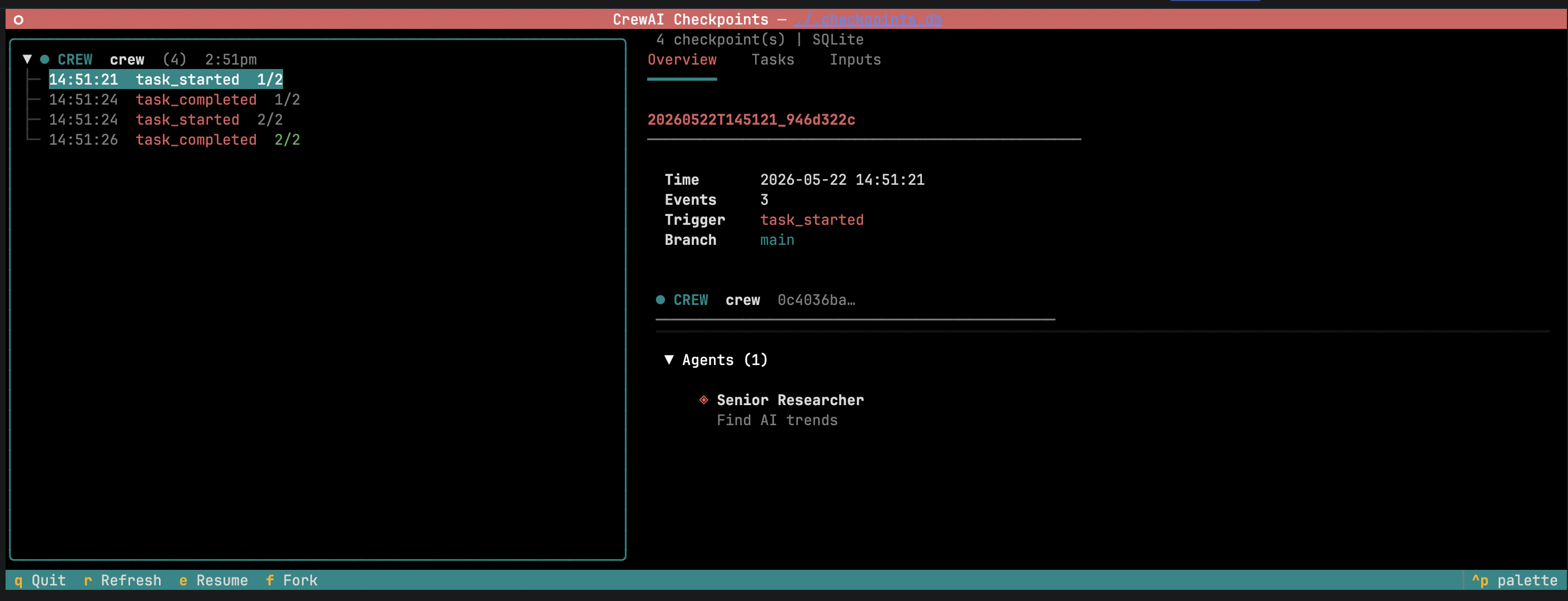
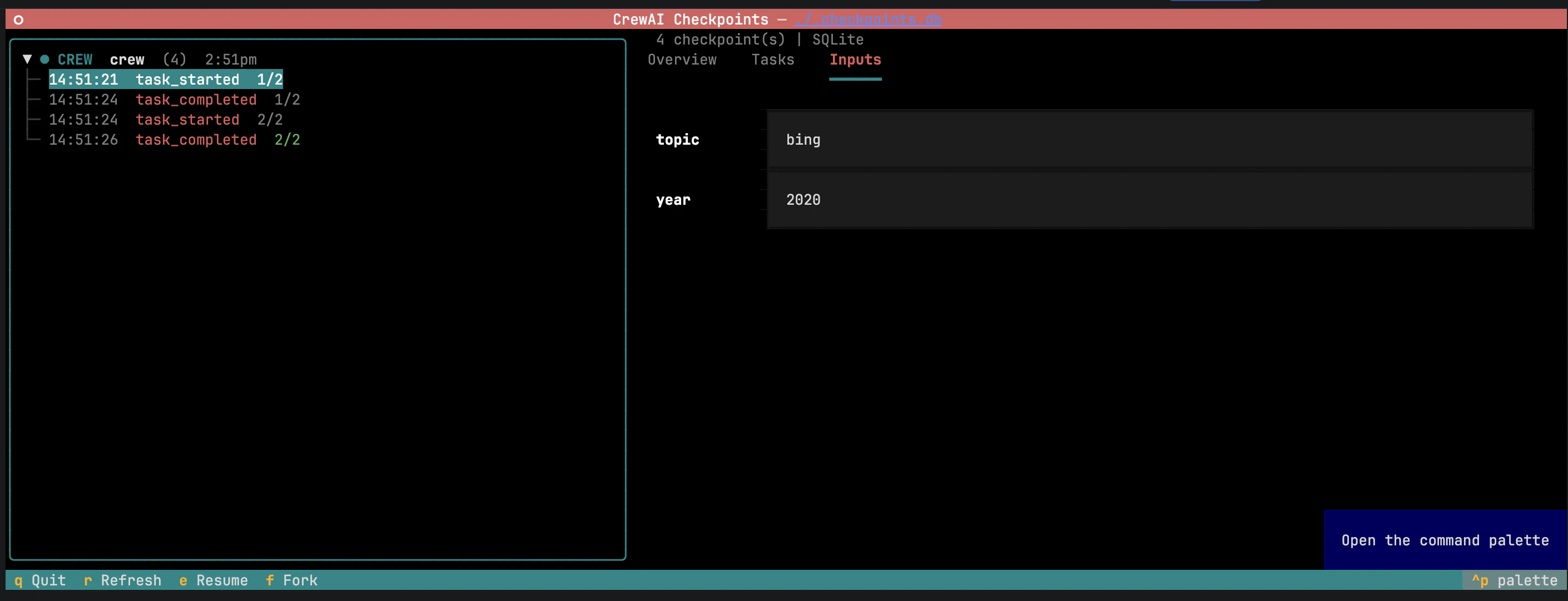
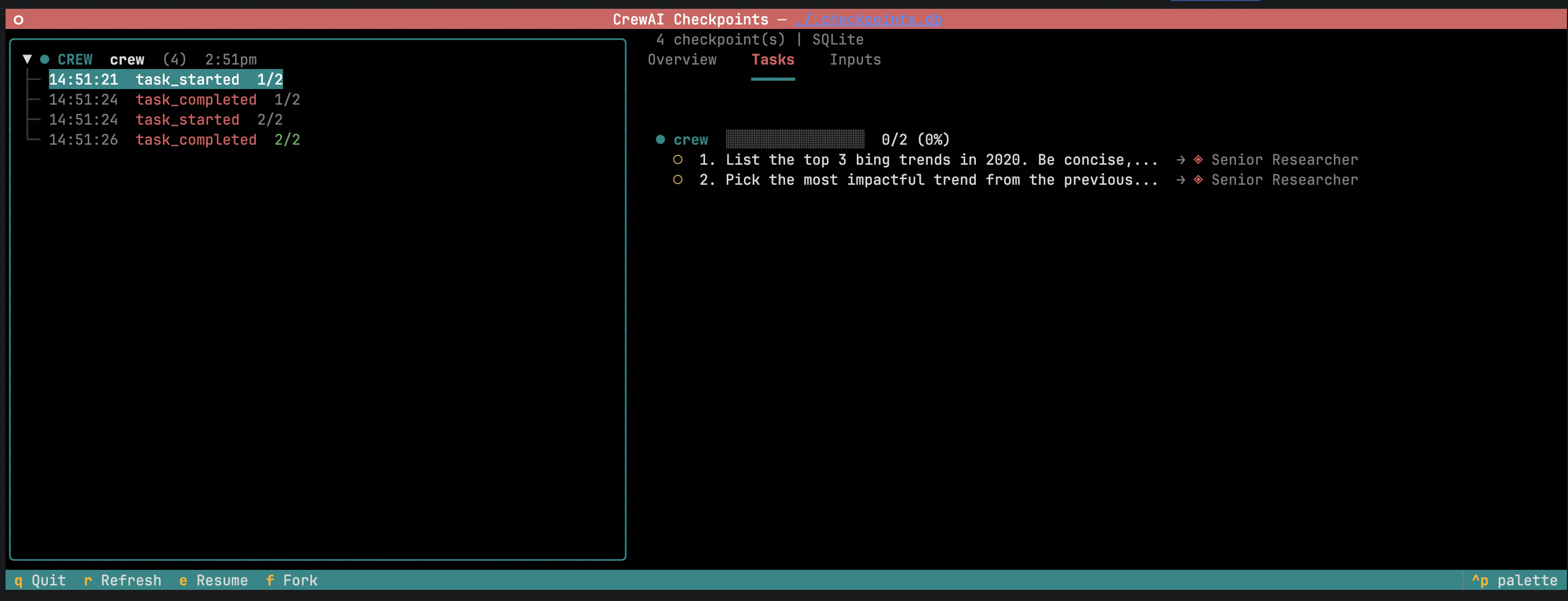
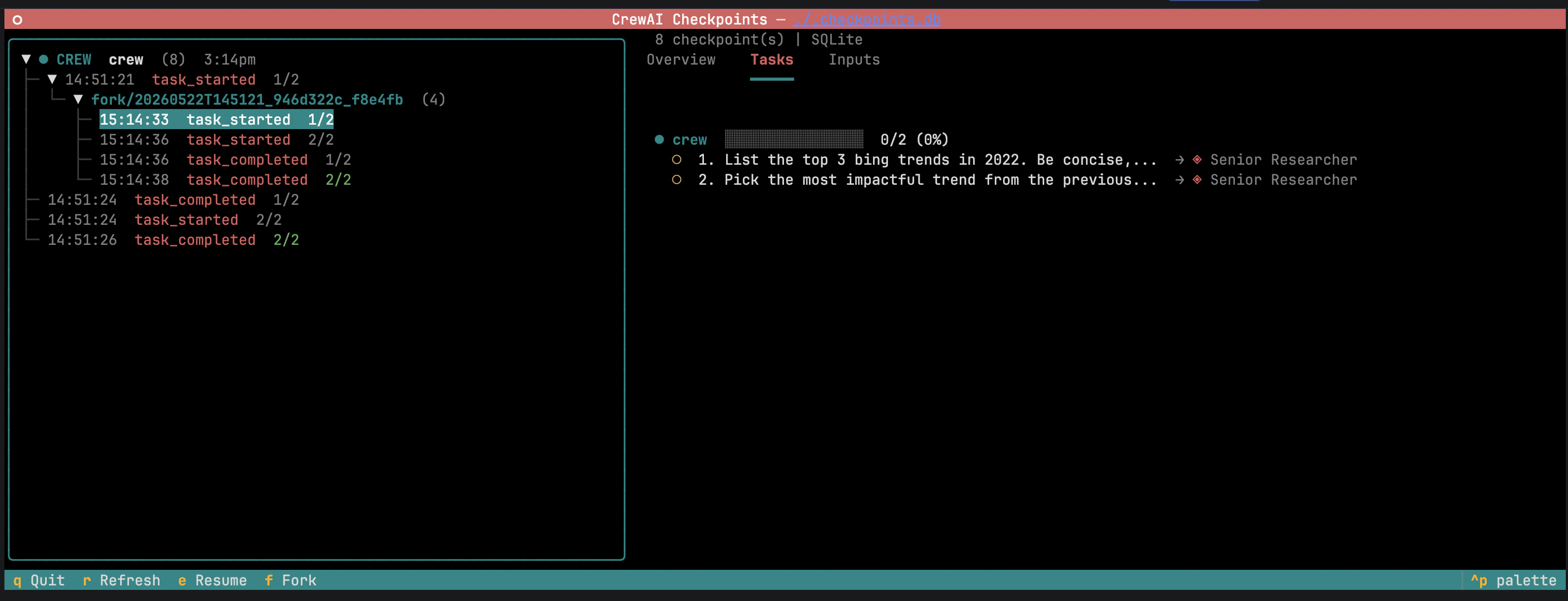
왼쪽 패널은 체크포인트를 브랜치별로 그룹화하며, 포크는 부모 아래에 중첩됩니다. 체크포인트를 선택하면 메타데이터, 엔티티 상태, 태스크 진행 상황이 있는 세부 정보 패널이 열립니다. Resume 은 실행을 계속하고, Fork 는 새 브랜치를 시작합니다. 세부 정보 패널에는 두 개의 편집 가능한 영역이 있습니다:
Inputs — 원래 kickoff의 입력으로, 미리 채워져 있으며 편집 가능합니다.
태스크 출력 — 완료된 태스크의 출력. 출력을 편집하고 Fork 를 누르면 다운스트림 태스크가 무효화되어 수정된 컨텍스트로 다시 실행됩니다.
“what if” 탐색에 유용합니다: 포크, 조정, 관찰.
crewai checkpoint list ./my_checkpoints crewai checkpoint info ./my_checkpoints/ < fil e > .json crewai checkpoint info ./.checkpoints.db
레퍼런스 CheckpointConfiglocation
str
기본값: "\"./.checkpoints\""
스토리지 대상. JsonProvider는 디렉토리, SqliteProvider는 데이터베이스 파일 경로.
on_events
list[CheckpointEventType | Literal["*"]]
기본값: "[\"task_completed\"]"
체크포인트를 트리거하는 이벤트 타입. CheckpointEventType은 Literal이므로 타입 체커가 자동 완성하고 지원되지 않는 값을 거부합니다. 전체 목록은 이벤트 타입 참조. provider
BaseProvider
기본값: "JsonProvider()"
스토리지 백엔드. JsonProvider 또는 SqliteProvider.
보관할 최대 체크포인트 수. 각 기록 후 가장 오래된 것이 제거됩니다.
restore_from
Path | str | None
기본값: "None"
from_checkpoint를 통해 전달될 때 복원할 체크포인트.
checkpoint 필드 값Crew, Flow, Agent에서 사용 가능.이벤트 타입 on_events는 CheckpointEventType 값의 임의 조합을 받습니다. 기본값 ["task_completed"]는 완료된 태스크당 하나의 체크포인트를 기록하며, ["*"]는 모든 이벤트와 일치합니다.["*"] 및 llm_call_completed와 같은 고빈도 이벤트는 많은 체크포인트를 기록하고 성능을 저하시킬 수 있습니다. max_checkpoints와 함께 사용하세요.
Task — task_started, task_completed, task_failed, task_evaluationCrew — crew_kickoff_started, crew_kickoff_completed, crew_kickoff_failed, crew_train_started, crew_train_completed, crew_train_failed, crew_test_started, crew_test_completed, crew_test_failed, crew_test_resultAgent — agent_execution_started, agent_execution_completed, agent_execution_error, lite_agent_execution_started, lite_agent_execution_completed, lite_agent_execution_error, agent_evaluation_started, agent_evaluation_completed, agent_evaluation_failedFlow — flow_created, flow_started, flow_finished, flow_paused, method_execution_started, method_execution_finished, method_execution_failed, method_execution_paused, human_feedback_requested, human_feedback_received, flow_input_requested, flow_input_receivedLLM — llm_call_started, llm_call_completed, llm_call_failed, llm_stream_chunk, llm_thinking_chunkLLM Guardrail — llm_guardrail_started, llm_guardrail_completed, llm_guardrail_failedTool — tool_usage_started, tool_usage_finished, tool_usage_error, tool_validate_input_error, tool_selection_error, tool_execution_errorMemory — memory_save_started, memory_save_completed, memory_save_failed, memory_query_started, memory_query_completed, memory_query_failed, memory_retrieval_started, memory_retrieval_completed, memory_retrieval_failedKnowledge — knowledge_search_query_started, knowledge_search_query_completed, knowledge_query_started, knowledge_query_completed, knowledge_query_failed, knowledge_search_query_failedReasoning — agent_reasoning_started, agent_reasoning_completed, agent_reasoning_failedMCP — mcp_connection_started, mcp_connection_completed, mcp_connection_failed, mcp_tool_execution_started, mcp_tool_execution_completed, mcp_tool_execution_failed, mcp_config_fetch_failedObservation — step_observation_started, step_observation_completed, step_observation_failed, plan_refinement, plan_replan_triggered, goal_achieved_earlySkill — skill_discovery_started, skill_discovery_completed, skill_loaded, skill_activated, skill_load_failedLogging — agent_logs_started, agent_logs_executionA2A — a2a_delegation_started, a2a_delegation_completed, a2a_conversation_started, a2a_conversation_completed, a2a_message_sent, a2a_response_received, a2a_polling_started, a2a_polling_status, a2a_push_notification_registered, a2a_push_notification_received, a2a_push_notification_sent, a2a_push_notification_timeout, a2a_streaming_started, a2a_streaming_chunk, a2a_agent_card_fetched, a2a_authentication_failed, a2a_artifact_received, a2a_connection_error, a2a_server_task_started, a2a_server_task_completed, a2a_server_task_canceled, a2a_server_task_failed, a2a_parallel_delegation_started, a2a_parallel_delegation_completed, a2a_transport_negotiated, a2a_content_type_negotiated, a2a_context_created, a2a_context_expired, a2a_context_idle, a2a_context_completed, a2a_context_pruned시스템 시그널 — SIGTERM, SIGINT, SIGHUP, SIGTSTP, SIGCONT와일드카드 — "*"는 모든 이벤트와 일치합니다. 스토리지 프로바이더 체크포인트당 하나의 파일, location 내부에 <timestamp>_<uuid>.json 형식으로 명명.
WAL 저널링이 있는 location의 단일 데이터베이스 파일.
CLI 명령 목적 crewai checkpointTUI 실행; 스토리지 자동 감지. crewai checkpoint --location <path>특정 위치에 대해 TUI 실행. crewai checkpoint list <path>체크포인트 나열. crewai checkpoint info <path>체크포인트 파일 또는 SQLite 데이터베이스의 최신 항목 검사.